
System of Equations: Elimination Method Visualized in GeoGebra
Loading the math board and drawing, please wait…
In collections
Systems of Linear Equations
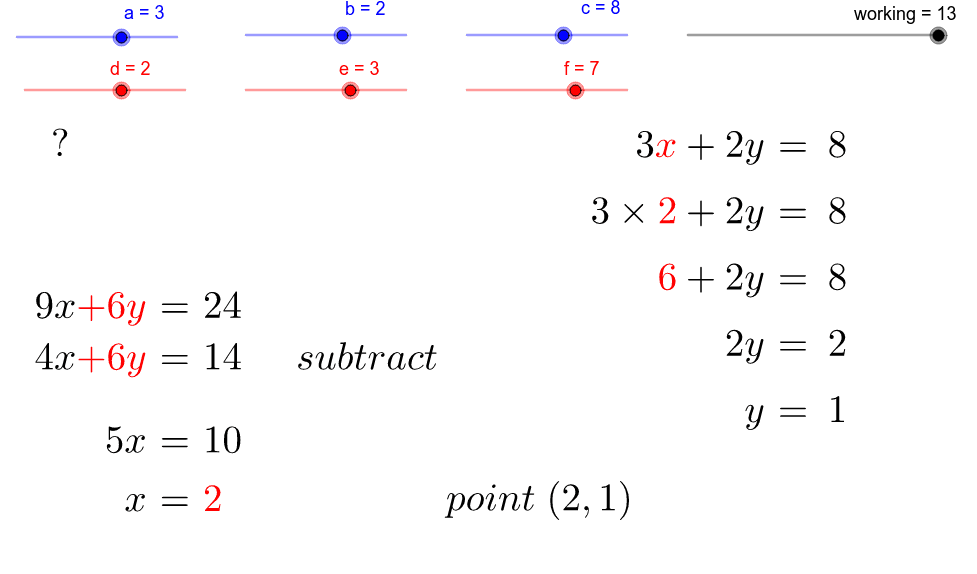
① This GeoGebra example demonstrates solving a system of two linear equations using the elimination (addition/subtraction) method, with step-by-step algebraic work shown alongside the graphical representation of the lines and their intersection point. ② The core mathematical concept is the elimination method for simultaneous equations, including transforming equations, finding the least common multiple (LCM) of coefficients, substituting to solve for variables, and interpreting the solution as the intersection of two lines. ③ Construction highlights: The GeoGebra commands used include LCM to compute coefficient multiples, FractionText to display fractions, and Point to mark the intersection; objects include lines d and f, points A and B, step-by-step text objects (text1–text6), variables xValue, soln_x, soln_y, and a working area with sliders or buttons to control the progression. ④ This is suitable for middle school to high school students learning systems of equations, and for teachers to illustrate each elimination step, bridging algebraic manipulation with geometric visualization of the solution point.
GeoGebra Commands & Parameters
LCM(b, e) → LCM1FractionText(xValue) → soln_{x}Point(k) → APoint(j) → BFractionText(a * xValue) → Frac_1FractionText(c - a * xValue) → Frac_2FractionText((c - a * xValue) / b) → soln_{y}
AI Drawing Prompt Reference
Draw a coordinate plane with two intersecting lines, marking their intersection point clearly. Beside the graph, show the step-by-step algebraic process of solving a system of two linear equations using the elimination method: write the two equations, multiply them by suitable factors to align coefficients, add or subtract to eliminate one variable, solve for the first unknown, then substitute back to find the second. Display each fractional or integer result as text near the corresponding step, with an arrow or guide line pointing to the intersection point, visually connecting the algebraic solution to the geometric intersection. Keep the layout clean for classroom demonstration.
The prompt above was compiled from the original drawing commands and is for reference only.