
Symmetry Axes and Geometric Construction
Loading the math board and drawing, please wait…
In collections
geometriadinamica.es
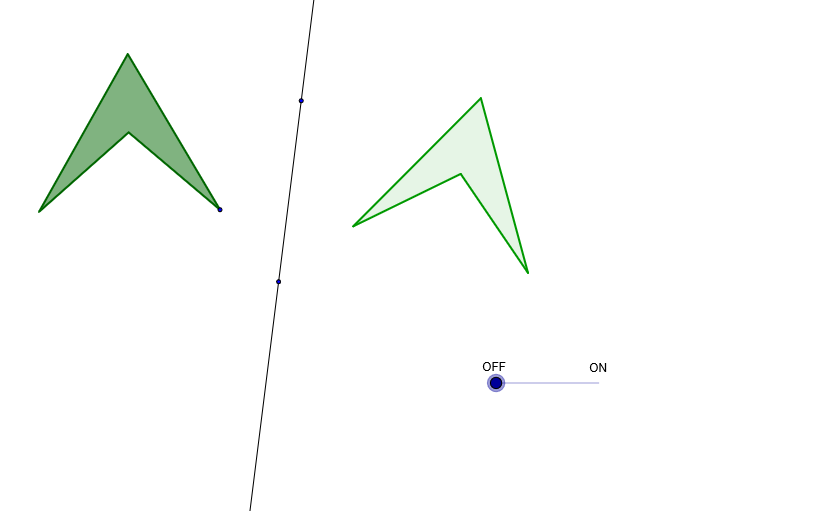
This example demonstrates how symmetry axes (Ejes de simetría) can be used to analyze geometric shapes. Key mathematical concepts include symmetry transformations, mirror operations, and geometric construction techniques. The construction involves GeoGebra commands such as Line, Segment, Circle, Midpoint, Intersect, Polygon, and Mirror to create symmetric figures. Suitable for middle school students learning geometric transformations or for math teaching activities exploring symmetry.
GeoGebra Commands & Parameters
Line(H, G) → iSegment(B, A) → aCircle(A, B) → cCircle(B, A) → dMidpoint(B, A) → CIntersect(d, c, 1) → DMidpoint(D, C) → EPolygon(D, B, E, A) → P, d_1, b, e, a_1Mirror(D, i) → D'Mirror(B, i) → B'Mirror(E, i) → E'Mirror(A, i) → A'Polygon(D', B', E', A') → P', d', b', e', a'Segment(E - (g * (D - E)), E + (g * (D - E))) → f
AI Drawing Prompt Reference
Draw a straight line as a symmetry axis. On one side of the axis, construct two overlapping circles and take one intersection point of the circles. Find the midpoint between this intersection point and the midpoint of the segment connecting the two circle centers. Using these four points, construct a quadrilateral by connecting them in sequence. Then reflect each vertex of this quadrilateral across the symmetry axis to obtain corresponding points on the other side, and connect these reflected points to form a second symmetric quadrilateral. Finally, draw a line segment passing through the middle point, extending in both directions along the diagonal direction of the original quadrilateral.
The prompt above was compiled from the original drawing commands and is for reference only.