
Sylvester Vector Relation
Loading the math board and drawing, please wait…
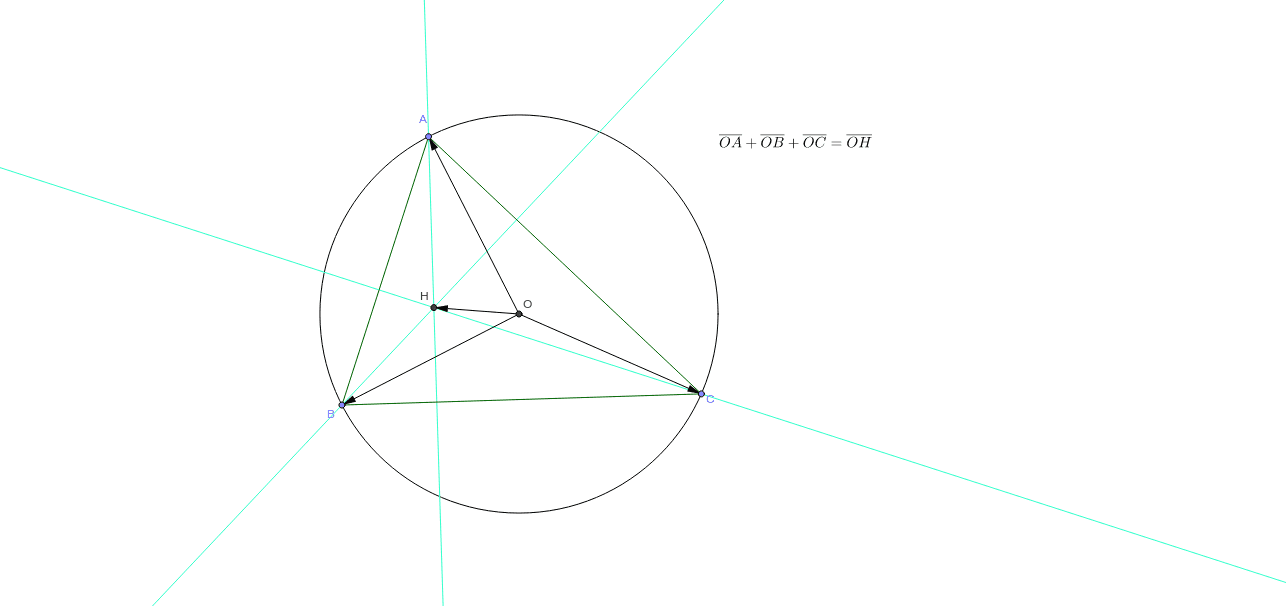
This example demonstrates the Sylvester vector relation, showing the symmetry between two vectors under rotation and reflection; core math concepts include vectors, rotation, trigonometric functions, symmetry, and reflection; constructed using commands like Circle, Point, Vector, Segment, OrthogonalLine in GeoGebra; suitable for high school and above students to explore the deep connection between vectors and geometric transformations.
GeoGebra Commands & Parameters
Intersect(xAxis, yAxis) → OCircle(O, A_1) → cPoint(c) → APoint(c) → BPoint(c) → CVector(O, A) → uVector(O, B) → vVector(O, C) → wSegment(A, B) → aSegment(B, C) → bSegment(C, A) → dOrthogonalLine(A, b) → fOrthogonalLine(B, d) → gOrthogonalLine(C, a) → hIntersect(g, f) → H
AI Drawing Prompt Reference
Draw a diagram illustrating the Sylvester vector relation, including the intersection point of coordinate axes, a circle, and three points on the circle. Connect these points with line segments to form a triangle, then draw perpendicular lines to each side of the triangle. Finally, find the intersection point of two of these perpendicular lines to demonstrate the symmetry between vectors under rotation and reflection.
The prompt above was compiled from the original drawing commands and is for reference only.