
Surface of Revolution Template by GeoGebra Classroom Activities
Loading the math board and drawing, please wait…
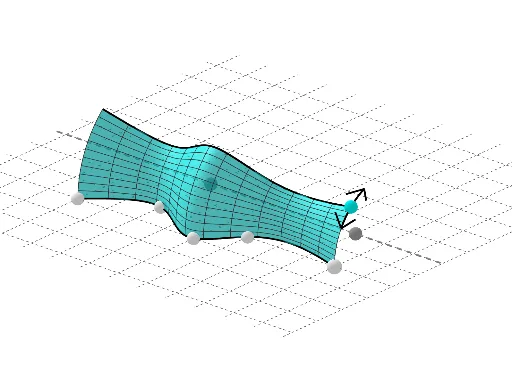
This GeoGebra template constructs a surface of revolution by rotating a parametric curve around an axis, dynamically illustrating the geometric generation of 3D surfaces. Key mathematical concepts include surface generation, rotational transformation, parametric curves, and solid geometry. The construction employs GeoGebra commands such as PointIn, Line, Circle, Rotate, Spline, Tangent, UnitVector, Surface, and CircleArc, along with points, lines, circles, angles, and segments as fundamental objects. It is suitable for calculus, analytic geometry, and solid geometry courses, helping learners visualize how planar curves transform into three-dimensional surfaces through rotation and understand the underlying geometric and calculus principles.
GeoGebra Commands & Parameters
PointIn(g) → ALine(P_1, P_2) → fCircle(f, A) → cCenter(c) → HPoint(c) → FAngle(A, H, F) → αIf(z(F) > 0, α, (2 * π) - α) → rotIf(rot > (2 * π) - (2 * π / 20), (2 * π) - rot, (2 * π / 20)) → ang'PointIn(g) → BPointIn(g) → CPointIn(g) → DPointIn(g) → ESpline(l1, 3) → aRotate(F, ang', f) → F'If(rot < (2 * π / 20), rot, (2 * π / 20)) → angRotate(F, (-ang), f) → F''Tangent(F', c) → h,UnitVector(Vector[Direction[h]]) → uSegment(F', G) → iRotate(F', (2 * π / 20), F') → F''_1Line(H, F''_1) → jRotate(F', π / 4, j) → F''_2Rotate(G, π / 4, j) → G'Segment(F''_2, G') → i'Mirror(F''_2, h) → IMirror(G', h) → G''Segment(I, G'') → i''Tangent(F'', c) → k,UnitVector(Vector[Direction[k]]) → vLine(H, F'') → lSegment(F'', J) → mRotate(F'', π / 4, l) → F'''Rotate(J, π / 4, l) → J'Segment(F''', J') → m'Mirror(F''', l) → LMirror(J', l) → J''Mirror(F''', k) → MMirror(J', k) → J''_1Segment(M, J''_1) → m''Surface(a, rot, f) → bCircleArc(H, F, F') → dCircleArc(H, M, F) → eRotate(a, rot, f) → a'
AI Drawing Prompt Reference
Create a 3D surface of revolution by first defining a smooth parametric curve through several points on a plane using a spline, then rotating this curve around a fixed axis line. On the curve pick a point, draw its tangent line and a unit direction vector, build several segments and apply mirror and rotation transformations to obtain symmetric auxiliary segments. Finally add two circular arcs linking key points to illustrate the generation of the surface as the curve sweeps around the axis.
The prompt above was compiled from the original drawing commands and is for reference only.