
Surface of Revolution - Disk 2.2
Loading the math board and drawing, please wait…
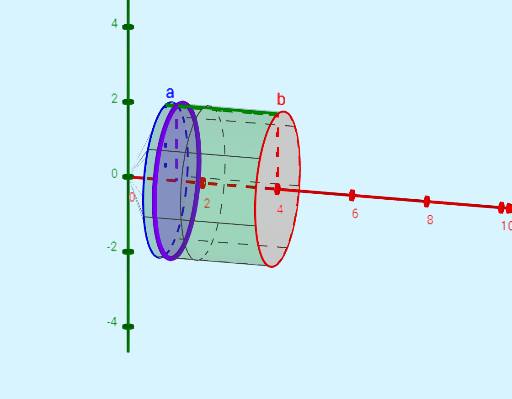
This example demonstrates the process of generating a surface of revolution. Key mathematical concepts include functions, coordinate geometry, and parametric equations. Using GeoGebra commands such as Segment, Surface, and Circle, the trajectory of the surface of revolution can be constructed. Suitable for high school mathematics education and learning.
GeoGebra Commands & Parameters
Segment(A, B) → gSurface(f, (2 * π)) → sSegment(B, C) → g_1Segment(A, D) → hCircle(B, f(b), xAxis) → cCircle(A, f(a), xAxis) → dCircle(G, f(trace), xAxis) → pSegment(G, E) → i
AI Drawing Prompt Reference
Draw a surface of revolution to demonstrate its generation process. Start by sketching a base line segment, then rotate a function graph around this segment to form the surface. Include several auxiliary circles and line segments, with radii equal to the function values at the endpoints of the base segment and a point on the curve, rotating around the axis. Connect relevant points to show the trajectory and key geometric relationships during rotation.
The prompt above was compiled from the original drawing commands and is for reference only.