
Surface integral of a vector field
Loading the math board and drawing, please wait…
In collections
MATH2001 - Calculus & Linear algebra II
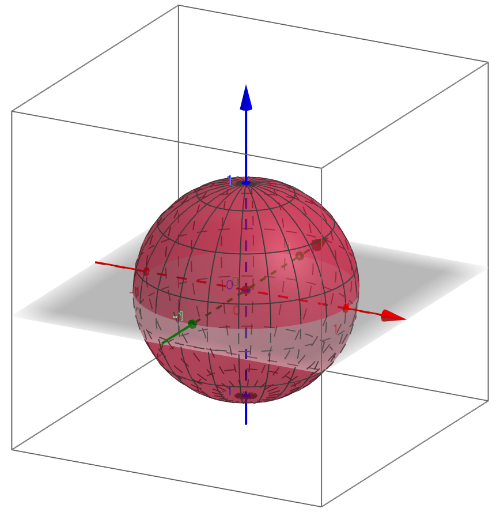
This example demonstrates the calculation and visualization of the surface integral of a vector field over a given surface. Key mathematical concepts include vector fields, surfaces, surface integrals, derivatives, and integrals. It utilizes GeoGebra commands/objects like Derivative, Surface, Integral, Textfield, Vector, UnitVector, and Sequence. Suitable for university students and educators in mathematics, physics, and related fields for teaching and concept exploration.
GeoGebra Commands & Parameters
Derivative(Phix, u) → DuPhixDerivative(Phix, v) → DvPhixDerivative(Phiz, v) → DvPhizDerivative(Phiy, v) → DvPhiyDerivative(Phiz, u) → DuPhizDerivative(Phiy, u) → DuPhiySurface(Phix(u, v), Phiy(u, v), Phiz(u, v), u, ux, uy, v, vx, vy) → PHIIntegral(d, v) → eIntegral(f, ux, uy) → IntegralTextfield(Fi) → InputBox1Textfield(Fj) → InputBox2Textfield(Fk) → InputBox3Textfield(Phix) → InputBox4Textfield(Phiy) → InputBox5Textfield(Phiz) → InputBox6Textfield(ux) → InputBox7Textfield(uy) → InputBox8Textfield(vx) → InputBox9Textfield(vy) → InputBox10Vector((0, 0, 0), (Ti(ux / 2, vy / 2), Tj(ux / 2, vy / 2), Tk(ux / 2, vy / 2))) → uUnitVector(u) → vSequence(Sequence[(j, k), j, ux, uy, abs(uy - ux) / grid1], k, vx, vy, abs(vy - vx) / grid2) → PointsRegionSequence(Sequence[PHI(x(Element[PointsRegion, i, j]), y(Element[PointsRegion, i, j])), i, 1, grid1 + 1], j, 1, grid2 + 1) → PointsSurfaceSequence(Sequence[Vector[(x(Element[PointsSurface, i, j]), y(Element[PointsSurface, i, j]), z(Element[PointsSurface, i, j])), (x(Element[PointsSurface, i, j]) + (scale * Fi(x(Element[PointsSurface, i, j]), y(Element[PointsSurface, i, j]), z(Element[PointsSurface, i, j]))), y(Element[PointsSurface, i, j]) + (scale * Fj(x(Element[PointsSurface, i, j]), y(Element[PointsSurface, i, j]), z(Element[PointsSurface, i, j]))), z(Element[PointsSurface, i, j]) + (scale * Fk(x(Element[PointsSurface, i, j]), y(Element[PointsSurface, i, j]), z(Element[PointsSurface, i, j]))))], i, 1, grid1 + 1], j, 1, grid2 + 1) → VectorsSurface
AI Drawing Prompt Reference
Visualize the surface integral of a vector field over a given surface, demonstrating the calculation and visualization process. Construct a 3D surface using parametric equations Phix, Phiy, Phiz, then plot vectors on the surface whose magnitudes and directions are determined by the vector field components Fi, Fj, Fk. Indicate vectors on the surface to illustrate the relationship between the vector field and the surface.
The prompt above was compiled from the original drawing commands and is for reference only.