
Surface Area & Volume of a Rectangular Prism (LP & Volume Balok) GeoGebra Demo
Loading the math board and drawing, please wait…
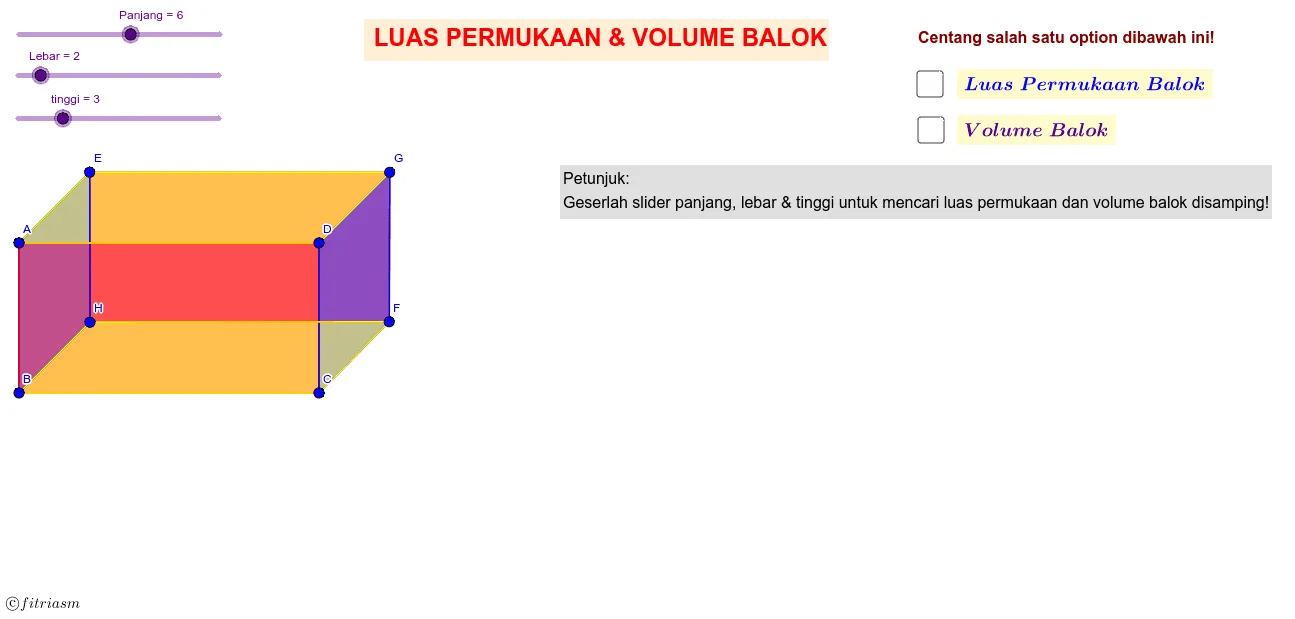
① This example demonstrates a 3D rectangular prism (balok) to visualize the calculation of its surface area (LP) and volume, ideal for middle school geometry. ② Core math concepts include summing the areas of six rectangular faces (surface area formula 2(lw+lh+wh)) and the volume formula l×w×h, reinforcing spatial reasoning and unit conversion. ③ Construction details: The GeoGebra commands Point and Polygon are used to define the eight vertices (A-H) and construct six rectangular faces (poly1 to poly6), with variables Lebar (width), Panjang (length), and tinggi (height) as adjustable objects for dynamic size changes. ④ Suitable for middle school solid geometry lessons, this interactive model helps students explore formula derivation and spatial structure through hands-on manipulation.
GeoGebra Commands & Parameters
Point(Circle[A, tinggi]) → BPoint(Circle[B, Panjang]) → CPoint(Circle[A, Panjang]) → DPoint(Circle[A, Lebar]) → EPoint(Circle[C, Lebar]) → FPoint(Circle[D, Lebar]) → GPoint(Circle[E, tinggi]) → HPolygon(E, G, F, H) → poly1, e, g, f, hPolygon(A, E, H, B) → poly2, a, e_1, h_1, bPolygon(A, D, C, B) → poly3, a_1, d, c, b_1Polygon(D, G, F, C) → poly4, d_1, g_1, f_1, c_1Polygon(B, C, F, H) → poly5, b_2, c_2, f_2, h_2Polygon(A, D, G, E) → poly6, a_2, d_2, g_2, e_2Polygon(I, J, K, L) → poly7, i, j, k, lPolygon(M, N, O, P) → poly8, m_1, n, o, p
AI Drawing Prompt Reference
Draw a 3D rectangular prism to visualize the calculation of its surface area and volume. Define the eight vertices of the prism and connect them to form six rectangular faces, each with distinct colors or styles. Add three sliders to control the length, width, and height of the prism, allowing dynamic size changes. Display the formulas for surface area and volume next to the prism, and use dynamic lines or highlights to show the area calculation for each face.
The prompt above was compiled from the original drawing commands and is for reference only.