
Surface Area of a Cuboid: Animated Net Folding
Loading the math board and drawing, please wait…
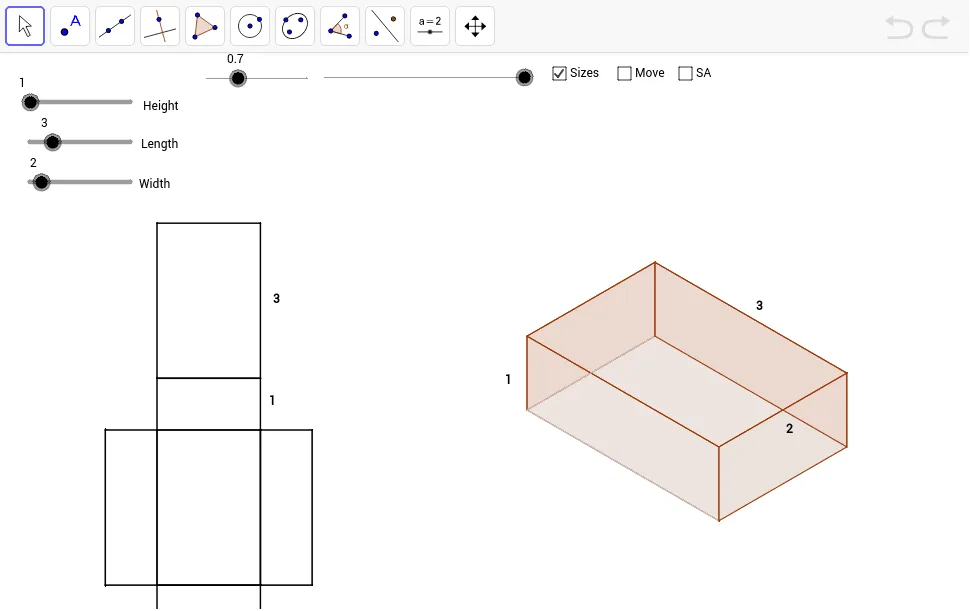
This example demonstrates a cuboid net folding into a 3‑D cuboid while dynamically showing the total surface area. The key mathematical concepts are solid geometry – cuboid properties, surface‑area computation, and the relationship between a net and its solid. Construction highlights: Vector commands define edge directions; Polygon builds each face; If and Midpoint drive the folding animation logic; Area calculates individual face areas for the sum. Objects such as PA, nHeight, nLength, nWidth, PB_2, PTP, etc., control dimensions and animation parameters. It is suitable for middle‑school geometry lessons on solids, high‑school solid‑geometry review, and interactive self‑study of surface‑area concepts.
GeoGebra Commands & Parameters
Vector(PTP_1, PB_3) → tpsbVector(PTPF_1, PTP_1) → tpf1Vector(PTP, PB_2) → tpa1Vector(PTPF, PTP) → tpfVector(PBK, PB) → bk1Vector(PBK_1, PB_1) → bk11Vector(PFT_1, PB_3) → ftb13Vector(PFT, PB_2) → fta1Vector(PSB_1, PB_3) → sbb13Vector(PSB, PB_1) → sbbVector(PSF_1, PB_2) → sfa1Vector(PSF, PB) → sfbPolygon(SF_3, SF, SF_1, SF_2) → aSideFront, a, b, c, dIf(dist < 100.0, PTPF + (dist * Length[tpf] / 100.0; Angle[tpf]), PTP + ((dist - 100.0) * Length[tpa1] / 100.0; Angle[tpa1])) → TP_3If(dist < 100.0, PTPF_1 + (dist * Length[tpf1] / 100.0; Angle[tpf1]), PTP_1 + ((dist - 100.0) * Length[tpsb] / 100.0; Angle[tpsb])) → TP_2Polygon(TP_3, TP_2, TP_1, TP) → aTop, a_1, b_1, c_1, d_1Polygon(BK_3, BK_2, BK_1, BK) → aBack, a_2, b_2, c_2, d_2Polygon(BT, BT_1, BT_2, BT_3) → aBottom, a_3, b_3, c_3, d_3Polygon(SB, SB_1, SB_2, SB_3) → aSideBack, a_4, b_4, c_4, d_4Polygon(FT, FT_1, FT_2, FT_3) → aFront, a_5, b_5, c_5, d_5Polygon(NA_2, NA, NA_1, NA_3) → planBottom, na_2, na, na_1, na_3Polygon(NA_2, NA_3, NFT_1, NFT) → planFront, na_4, na_5, nft_1, nftPolygon(NA, NSF, NSF_1, NA_2) → planSideFront, na_6, nsf, nsf_1, na_7Polygon(NA_1, NSB, NSB_1, NA_3) → planSideBack, na_8, nsb, nsb_1, na_9Polygon(NA, NBK, NBK_1, NA_1) → planBack, na_{10}, nbk, nbk_1, na_{11}Polygon(NBK, NTPT, NTPF_1, NBK_1) → planTop, nbk_2, ntpt, ntpf_1, nbk_3Midpoint(nft_1) → HnfMidpoint(ntpf_1) → HplMidpoint(nbk_1) → HpbMidpoint(b_1) → HXtsMidpoint(d_2) → HXbsMidpoint(c_5) → HXfsArea(BK_3, BK_2, BK_1, BK) → bb
AI Drawing Prompt Reference
Create a cuboid net composed of six rectangular faces representing the front, back, left, right, top, and bottom sides. Include sliders to control a folding animation that gradually brings the flat net into a three‑dimensional cuboid, while dynamically displaying the total surface area. Each face should be labeled with its length, width, and height dimensions, and the animation should show the area calculation for every face and their sum. Allow the user to adjust the length, width, and height parameters to see how the surface area changes in real time.
The prompt above was compiled from the original drawing commands and is for reference only.