
Surface Area: Intuitive Introduction
Loading the math board and drawing, please wait…
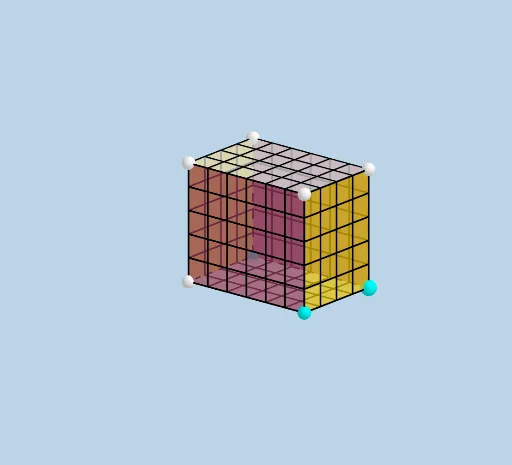
This example provides an intuitive introduction to surface area in solid geometry. It covers key concepts such as length, width, and height. Using GeoGebra commands like Ray, Prism, Net, and others, the example constructs the net of a prism and demonstrates surface area calculations through translations and reflections. Suitable for middle school and above students learning solid geometry and surface area.
GeoGebra Commands & Parameters
Ray((0, 0, 0), (1, 0, 0)) → fRay((0, 0, 0), (0, 1, 0)) → gRay((0, 0, 0), (0, 0, 1)) → hPrism(E, A, D, B, C) → d, F, edgeAE, edgeAD, edgeBD, edgeBE, edgeCE, edgeAF, edgeDG, edgeBH, edgeCF, edgeFG, G, edgeGH, edgeCH, H, faceADBE, faceAECF, faceADGF, faceBDGH, faceBECH, faceCFGHNet(d, openclose) → i, I, R, S, T, U, V, faceIJKL, faceIJNM, faceJKPO, faceKLRQ, faceILST, J, faceMNUV, edgeIJ, edgeJK, edgeKL, edgeIL, edgeIM, edgeMN, edgeJN, edgeJO, edgeOP, K, edgeKP, edgeKQ, edgeQR, edgeLR, edgeLS, edgeST, edgeIT, edgeNU, edgeUV, edgeMV, L, M, N, O, P, QSequence(Segment[(i, 0, 0), (i, WIDTH, 0)], i, 1, LENGTH - 1, 1) → L_1Translate(L_1, Vector[A, F]) → L_2Sequence(Segment[(0, i + 1, 0), (LENGTH, i + 1, 0)], i, 0, WIDTH - 2) → L_3Translate(L_3, Vector[A, F]) → L_4Vector(M, V) → uSequence((x(M) + i, y(M), z(M)), i, 1, LENGTH - 1, 1) → L_5Translate(L_5, u) → L_6Sequence(Segment[Element[L_5, i], Element[L_6, i]], i, 1, LENGTH - 1) → L_7Sequence((x(M), y(M) + (i * y(u) / WIDTH), z(M) + (i * z(u) / WIDTH)), i, 1, WIDTH - 1, 1) → L_8Vector(V, U) → vTranslate(L_8, v) → L_9Sequence(Segment[Element[L_8, i], Element[L_9, i]], i, 1, WIDTH - 1) → L_{10}Vector(A, O) → wSequence((x(A) + (i * x(w) / HEIGHT), y(A), z(A) + (i * z(w) / HEIGHT)), i, 1, HEIGHT - 1, 1) → L_{11}Vector(O, P) → lTranslate(L_{11}, l) → L_{12}Sequence(Segment[Element[L_{11}, i], Element[L_{12}, i]], i, 1, HEIGHT - 1) → L_{13}Sequence((x(O), y(O) + (i * y(l) / WIDTH), z(O) + (i * z(l) / WIDTH)), i, 1, WIDTH - 1, 1) → L_{14}Translate(L_{14}, Vector[(-w)]) → L_{15}Sequence(Segment[Element[L_{14}, i], Element[L_{15}, i]], i, 1, WIDTH - 1) → L_{16}Mirror(L_{13}, k) → L_{17}Mirror(L_{16}, k) → L_{18}Vector(D, Q) → mSequence((x(B) + (i * x(v) / LENGTH), y(B), z(B)), i, 1, LENGTH - 1, 1) → L_{19}Translate(L_{19}, m) → L_{20}Sequence(Segment[Element[L_{19}, i], Element[L_{20}, i]], i, 1, LENGTH - 1) → L_{21}Sequence((x(B), y(B) + (i * y(m) / HEIGHT), z(B) + (i * z(M) / HEIGHT)), i, 1, HEIGHT - 1, 1) → L_{22}Translate(L_{22}, v) → L_{23}Sequence(Segment[Element[L_{22}, i], Element[L_{23}, i]], i, 1, HEIGHT - 1) → L_{24}Mirror(L_{21}, n) → L_{25}Mirror(L_{24}, n) → L_{26}
AI Drawing Prompt Reference
Draw a 3D rectangular prism with one vertex at the origin, extending along the three coordinate axes for length, width, and height. Show the solid prism first, then unfold its surface into a flat net consisting of six rectangular faces with fold edges. Add grid lines on both the prism and the net, evenly spaced along the length, width, and height directions, to help visualize surface area. Finally, mirror some grid lines on the net to show correspondence with the solid's faces. The overall figure aims to intuitively explain surface area.
The prompt above was compiled from the original drawing commands and is for reference only.