
Surface Area from Net of Hexagonal Prism
Loading the math board and drawing, please wait…
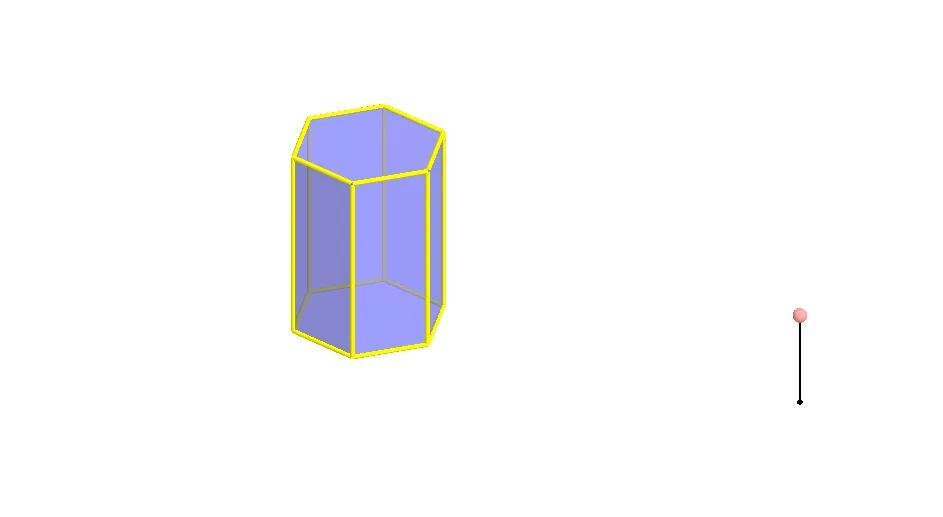
This GeoGebra example demonstrates how to compute the surface area of a hexagonal prism using its net (unfolded 2D representation). The core mathematical concept is solid geometry, specifically the relationship between a 3D prism and its net, and the calculation of total surface area as the sum of six rectangular lateral faces and two hexagonal bases. The construction uses GeoGebra commands: Polygon to create the base hexagon, Prism to generate the 3D solid, Segment for edges, and Rotate and Mirror transformations to unfold each face into a plane, resulting in a complete net. Key objects include vertices A, B and faces face1, faceBCHG, etc., allowing users to inspect individual face dimensions. This is suitable for middle or high school geometry lessons, helping students visualize the net-to-solid connection and practice surface area calculations.
GeoGebra Commands & Parameters
Polygon(A, B, 6, xOyPlane) → poly1, a, F, b, c, d, e, f, C, D, EPrism(poly1, A + (0, 0, 4)) → g, G, faceEFKJ, face2, face3, edge1, edgeBG, edgeCH, edgeDI, edgeEJ, edgeFK, edge2, H, edgeGH, edgeHI, edgeIJ, edgeJK, edge3, I, J, K, face1, faceBCHG, faceCDIH, faceDEJISegment(M, M + (0, 0, 2)) → hPoint(h) → NRotate(Polygon[E, D, I, J], (90° * t), Segment[D, E]) → poly2Rotate(Polygon[G, H, I, J, K, L], (90° * t), Segment[I, J]) → poly3Rotate(poly3, (90° * t), Segment[D, E]) → poly3'Rotate(Polygon[C, D, I, H], (60° * t), Segment[D, I]) → poly4Rotate(poly4, (90° * t), Segment[D, E]) → poly4'Mirror(poly4, OrthogonalPlane[Midpoint[D, E], Segment[D, E]]) → poly4'_1Rotate(poly4'_1, (90° * t), Segment[D, E]) → poly5Rotate(C, (60° * t), Segment[D, I]) → C'Mirror(Polygon[D, E, J, I], OrthogonalPlane[Midpoint[D, C'], Segment[D, C']]) → poly6Mirror(poly6, OrthogonalPlane[Midpoint[D, E], Segment[D, E]]) → poly6'Rotate(poly6, (90° * t), Segment[D, E]) → poly6'_1Rotate(poly6', (90° * t), Segment[D, E]) → poly6''Mirror(E, OrthogonalPlane[Midpoint[D, C'], Segment[D, C']]) → E'Mirror(poly4, OrthogonalPlane[Midpoint[E', C'], Segment[E', C']]) → poly4'_2Rotate(poly4'_2, (90° * t), Segment[D, E]) → poly7Rotate(poly3, (90° * t), Segment[D, E]) → poly3'_1Polygon(A, B, 6, xOyPlane) → poly8, i, R, j, k, l, m, n, O, P, QRotate(poly6', (90° * t), Segment[D, E]) → poly6''_1Rotate(poly4'_1, (90° * t), Segment[D, E]) → poly9Rotate(Polygon[E, D, I, J], (90° * t), Segment[D, E]) → poly10Rotate(poly4, (90° * t), Segment[D, E]) → poly4'_3Rotate(poly6, (90° * t), Segment[D, E]) → poly6'_2Rotate(poly4'_2, (90° * t), Segment[D, E]) → poly11
AI Drawing Prompt Reference
Draw the net of a regular hexagonal prism. Start with a regular hexagon as the base, then extrude it upward to form a 3D prism with height 4. Next, unfold the six rectangular lateral faces and the two hexagonal bases by rotating or reflecting them about their shared edges, laying them flat on the same plane. The resulting net shows all eight faces connected along their edges, with each face's dimensions visible. This illustrates the transformation from solid to plane for surface area calculation.
The prompt above was compiled from the original drawing commands and is for reference only.