
Surface and Plane Intersection Demo
Loading the math board and drawing, please wait…
In collections
intersection: surface-surface, curve-curve
surface 3D /3D-Oberflächen 1
surface 3D /3D-Oberflächen 1
intersection: surface-surface, curve-curve
intersection: surface-surface, curve-curve
intersection: surface-surface, curve-curve
surface 3D
surface 3D
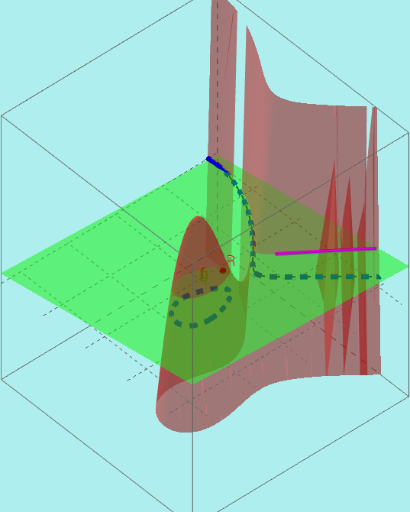
This example demonstrates the intersection curve between a surface and a plane in 3D space and its dynamic behavior. Key math concepts include spatial geometry, analytical geometry, integral calculus, and derivatives from calculus. It utilizes GeoGebra commands and objects such as ImplicitCurve, Point, PathParameter, and Sequence. Suitable for high school students and math enthusiasts to understand the properties of intersection curves between surfaces and planes.
GeoGebra Commands & Parameters
ImplicitCurve(f(x, y) - g(x, y)) → bbPoint(bb) → APathParameter(A) → pAPoint(bb) → BPathParameter(B) → pBSequence(Point[bb, i], i, pA, pB, (pB - pA) / n) → liste1Sequence((x(Element[liste1, i]), y(Element[liste1, i]), g(x(Element[liste1, i]), y(Element[liste1, i]))), i, 1, Length[liste1]) → liste2Sequence(Segment[Element[liste2, i], Element[liste2, i + 1]], i, 1, Length[liste2] - 1) → liste3ImplicitCurve(f(x, y) - g(x, y)) → aPoint(bb) → CPoint(bb) → DPathParameter(C) → pCPathParameter(D) → pDSequence(Point[bb, i], i, pC, pD, (pD - pC) / n) → liste4Sequence((x(Element[liste4, i]), y(Element[liste4, i]), g(x(Element[liste4, i]), y(Element[liste4, i]))), i, 1, Length[liste4]) → liste5Sequence(Segment[Element[liste5, i], Element[liste5, i + 1]], i, 1, Length[liste5] - 1) → liste6
AI Drawing Prompt Reference
Draw the intersection curve between a surface and a plane in 3D space to show its dynamic behavior. Start by plotting an implicit curve defined by the difference of two functions as the intersection. Then, take points along the curve and generate a series of points, connecting each to the corresponding point on the surface. Use these line segments to approximate the intersection, and display multiple intersections to illustrate the dynamic effect.
The prompt above was compiled from the original drawing commands and is for reference only.