
Sum to 100
Loading the math board and drawing, please wait…
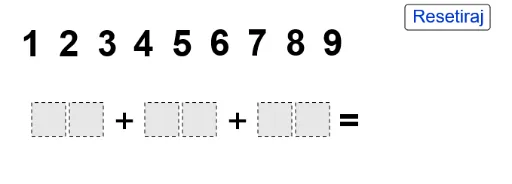
This example demonstrates how to construct a mathematical model for summing to 100 using geometric shapes; involves core concepts like addition, fractal geometry, rhombus, symmetry, and trigonometric functions; construction highlights include commands like Polygon, If, Mod, Div, Sequence, and objects such as text, points, and polygons; suitable for high school mathematics teaching, exploring the intersection of geometry and algebra, and symmetry in fractal patterns.
GeoGebra Commands & Parameters
Polygon((0, 0), (0.9, 0), 4) → poly1Polygon((2, 0), (2.9, 0), 4) → poly3Polygon((1, 0), (1.9, 0), 4) → poly2Polygon((-2, 0), (-1.1, 0), 4) → poly5Polygon((-1, 0), (-0.1, 0), 4) → poly6Polygon((0, 1), (0.9, 1), 4) → poly4Polygon((-5, 0), (-4.1, 0), 4) → poly8Polygon((-4, 0), (-3.1, 0), 4) → poly9Polygon((0, 2), (0.9, 2), 4) → poly7If(IsInRegion[A, poly9], 1, If[IsInRegion[B, poly9], 2, If[IsInRegion[C, poly9], 3, If[IsInRegion[D, poly9], 4, If[IsInRegion[E, poly9], 5, If[IsInRegion[F, poly9], 6, If[IsInRegion[G, poly9], 7, If[IsInRegion[H, poly9], 8, If[IsInRegion[I, poly9], 9, 0]]]]]]]]) → nineSumIf(IsInRegion[A, poly8], 1, If[IsInRegion[B, poly8], 2, If[IsInRegion[C, poly8], 3, If[IsInRegion[D, poly8], 4, If[IsInRegion[E, poly8], 5, If[IsInRegion[F, poly8], 6, If[IsInRegion[G, poly8], 7, If[IsInRegion[H, poly8], 8, If[IsInRegion[I, poly8], 9, 0]]]]]]]]) → eightSumIf(IsInRegion[A, poly6], 1, If[IsInRegion[B, poly6], 2, If[IsInRegion[C, poly6], 3, If[IsInRegion[D, poly6], 4, If[IsInRegion[E, poly6], 5, If[IsInRegion[F, poly6], 6, If[IsInRegion[G, poly6], 7, If[IsInRegion[H, poly6], 8, If[IsInRegion[I, poly6], 9, 0]]]]]]]]) → sixSumIf(IsInRegion[A, poly5], 1, If[IsInRegion[B, poly5], 2, If[IsInRegion[C, poly5], 3, If[IsInRegion[D, poly5], 4, If[IsInRegion[E, poly5], 5, If[IsInRegion[F, poly5], 6, If[IsInRegion[G, poly5], 7, If[IsInRegion[H, poly5], 8, If[IsInRegion[I, poly5], 9, 0]]]]]]]]) → fiveSumIf(IsInRegion[A, poly3], 1, If[IsInRegion[B, poly3], 2, If[IsInRegion[C, poly3], 3, If[IsInRegion[D, poly3], 4, If[IsInRegion[E, poly3], 5, If[IsInRegion[F, poly3], 6, If[IsInRegion[G, poly3], 7, If[IsInRegion[H, poly3], 8, If[IsInRegion[I, poly3], 9, 0]]]]]]]]) → threeSumIf(IsInRegion[A, poly2], 1, If[IsInRegion[B, poly2], 2, If[IsInRegion[C, poly2], 3, If[IsInRegion[D, poly2], 4, If[IsInRegion[E, poly2], 5, If[IsInRegion[F, poly2], 6, If[IsInRegion[G, poly2], 7, If[IsInRegion[H, poly2], 8, If[IsInRegion[I, poly2], 9, 0]]]]]]]]) → twoSumMod(onesPlace, 10) → SAoneMod(tensPlace + Div[onesPlace, 10], 10) → SAtenDiv(onesPlace, 10) → SAtensCarryDiv(tensPlace + Div[onesPlace, 10], 10) → SAhundredsCarrySequence(Point[{i, 2.5}], i, -5, 3) → anchorsPolygon(L, M, N, O) → q1, l, m, n, o
AI Drawing Prompt Reference
Draw a series of squares with side lengths decreasing by 0.9, arranged from left to right. Each square contains a number, and the sum of all numbers is 100. The units digit starts from the bottom-left square and moves right and up, while the tens digit starts from the right of the units digit and moves right.
The prompt above was compiled from the original drawing commands and is for reference only.