
Integer Comparison by Damir Belavić
Loading the math board and drawing, please wait…
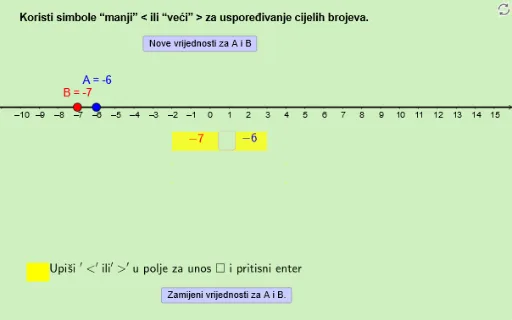
This example demonstrates how to compare integers through graphical methods. Core math concepts include integers, area, square, correlation, equations, and piecewise functions. Construction highlights the use of GeoGebra commands and objects like Random, Point, Polygon, Textfield, If to dynamically generate polygons and text fields, visually illustrating inequality relationships. Suitable for middle school and above mathematics education, helping students understand integer comparison and inequality concepts.
GeoGebra Commands & Parameters
Random(-11, 13) → valueARandom(-11, 13) → valueBPoint(a) → CPolygon(D4, D3, D2, D1) → poly1, d4, d3, d2, d1Polygon(E4, E3, E2, E1) → poly2, e4, e3, e2, e1Textfield(inequalitysign) → inputBoxInequalitySignIf(b ≟ true ∧ x(B) > x(A), ">", If[b ≟ false ∧ x(A) > x(B), ">", "<"]) → CorrectAnswerIf(CorrectAnswer ≟ inequalitysign, "Točno!", "Ček malo,...Pokušaj ponovo!") → text2
AI Drawing Prompt Reference
Draw two polygons using randomly generated integer points as vertices, compare their areas, and display the comparison result with text to dynamically illustrate the relationship between the integers.
The prompt above was compiled from the original drawing commands and is for reference only.