
Sum of Fractions
Loading the math board and drawing, please wait…
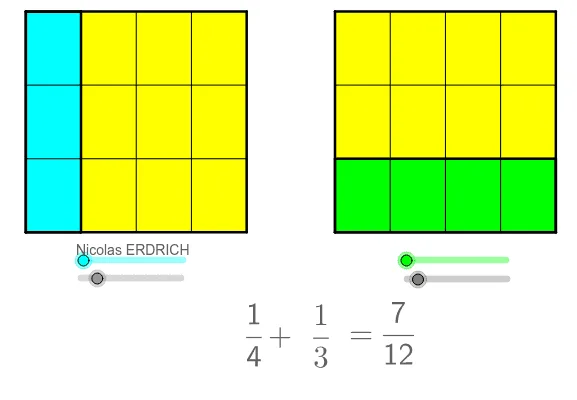
This example demonstrates the process of summing fractions. The core mathematical concepts involved are fraction addition. Using GeoGebra commands such as Line, Circle, Intersect, OrthogonalLine, etc., a geometric model of fraction summation can be constructed. Suitable for middle school and above students to learn fraction addition and geometric construction.
GeoGebra Commands & Parameters
Line(A, xAxis) → a_2Circle(A, 5) → c_2Intersect(c_2, a_2) → B_1, BCircle(B, 2) → d_3Intersect(d_3, a_2, 2) → ECircle(E, 5) → eIntersect(e, a_2, 2) → FCircle(F, 2) → fIntersect(f, a_2, 2) → ICircle(I, 5) → gIntersect(g, a_2, 2) → JOrthogonalLine(A, xAxis) → b_1Intersect(c_2, b_1, 2) → DOrthogonalLine(J, a_2) → hOrthogonalLine(D, b_1) → iIntersect(h, i) → KOrthogonalLine(B, i) → jOrthogonalLine(E, i) → kOrthogonalLine(F, i) → lOrthogonalLine(I, i) → mIntersect(i, j) → CIntersect(l, i) → GIntersect(m, i) → LIntersect(k, i) → HPolygon(A, D, C, B) → poly1, a_1, h_1, j_1, c_1Polygon(E, F, G, H) → poly2, d_1, e_1, k_1, m_1Sequence(A + k * (B - A) / b, k, 0, b) → liste1Sequence(D + k * (C - D) / b, k, 0, b) → liste2Sequence(Segment[Element[liste1, k], Element[liste2, k]], k, 0, b) → liste3Polygon(A, Element[liste1, a + 1], Element[liste2, a + 1], D) → poly4, a_3, n, p, d_2Sequence(E + (H - E) * k / d, k, 0, d) → liste4Sequence(F + (G - F) * k / d, k, 0, d) → liste5Sequence(Segment[Element[liste4, k], Element[liste5, k]], k, 0, d) → liste6Polygon(E, Element[liste4, c + 1], Element[liste5, c + 1], F) → poly5, e_2, q, r, f_2Sequence(I + (J - I) * k / b, k, 0, b) → liste7Sequence(L + (K - L) * k / b, k, 0, b) → liste8Sequence(I + (L - I) * k / d, k, 0, d) → liste9Sequence(J + (K - J) * k / d, k, 0, d) → liste10Sequence(A + (D - A) * k / d, k, 0, d) → liste13Sequence(B + (C - B) * k / d, k, 0, d) → liste14Sequence(Segment[Element[liste13, k], Element[liste14, k]], k, 0, d) → liste15Sequence(E + (F - E) * k / b, k, 0, b) → liste16Sequence(H + (G - H) * k / b, k, 0, b) → liste17Sequence(Segment[Element[liste16, k], Element[liste17, k]], k, 0, b) → liste18GCD(val1, val2) → val3Polygon(I, J, K, L) → poly3, i_1, j_2, k_2, l_1Vector(E, I) → uTranslate(liste6, u) → liste6'Translate(liste18, u) → liste18'Vector(A, I) → vTranslate(I, v) → I'Translate(J, v) → J'Translate(K, v) → K'Translate(L, v) → L'If(floor(val1 / val2) ≟ val1 / val2, val1 / val2, false) → val5Text("=" + val5) → texte3
AI Drawing Prompt Reference
Draw a horizontal line from the origin and a large circle centered at the origin intersecting it, producing equally spaced points along the line. From these points, draw alternating circles of different radii to mark further points on the line. Construct a vertical line through the origin meeting the first circle at an upper point, then draw a horizontal line from that point and a vertical line from the rightmost intersection, forming a rectangle. Inside the rectangle, divide the sides into equal segments and connect corresponding division points with parallel line segments, creating a grid of fraction strips. Finally, translate the right grid horizontally to align with the left strip, visually demonstrating the addition of fractions.
The prompt above was compiled from the original drawing commands and is for reference only.