
Suggs Polygons
Loading the math board and drawing, please wait…
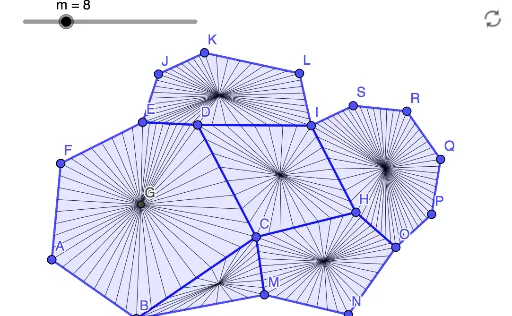
This example demonstrates Leigh Suggs' mathematical art. It involves key concepts such as the centroid or barycenter of polygons, lengths, and sequences. Using GeoGebra commands like Polygon, Length, and Sequence, a series of polygons can be constructed. Suitable for high school and above students or teachers for geometric construction and exploring polygon properties.
GeoGebra Commands & Parameters
Polygon(A, B, C, D, E, F) → poly1, a, b, c, d, e, fLength({Vertex[poly1]}) → nSequence(Distance[Element[l1, Mod[i, n] + 1], Element[l1, Mod[i + 1, n] + 1]], i, 0, n - 1) → l2IndexOf(Max[l2], l2) → gFlatten(Sequence[Sequence[((1 - i / m) * Element[l1, Mod[j, n] + 1]) + (i / m * Element[l1, Mod[j + 1, n] + 1]), i, 1, m], j, 0, n - 1]) → l3Sequence(Segment[G, Element[l3, i]], i, 1, (m * n)) → l4Polygon(D, C, H, I) → q1, d_1, c_1, h, iburst(q1, m) → l5Polygon(E, J, K, L, I, D) → poly2, e_1, j, k, l, i_1, d_2burst(poly2, m) → l6Polygon(C, M, N, O, H) → poly3, c_2, m_1, n_1, o, h_1burst(poly3, m) → l7Polygon(B, C, M) → t1, m_2, b_1, c_3burst(t1, m) → l8Polygon(I, H, O, P, Q, R, S) → poly4, i_2, h_2, o_1, p, q, r, sburst(poly4, m) → l9
AI Drawing Prompt Reference
Create a series of polygons to demonstrate centroid, edge lengths, and sequences. Start with a hexagon, calculate its vertex lengths, generate a sequence, and find the index of the maximum value. Use the sequence and vertex coordinates to create new polygons and segments, scaling and connecting vertices to form intricate geometric patterns. The final image should include nested and transformed polygons, showcasing the beauty of geometric construction and transformation.
The prompt above was compiled from the original drawing commands and is for reference only.