
Subtracting Fractions with Like Denominators
Loading the math board and drawing, please wait…
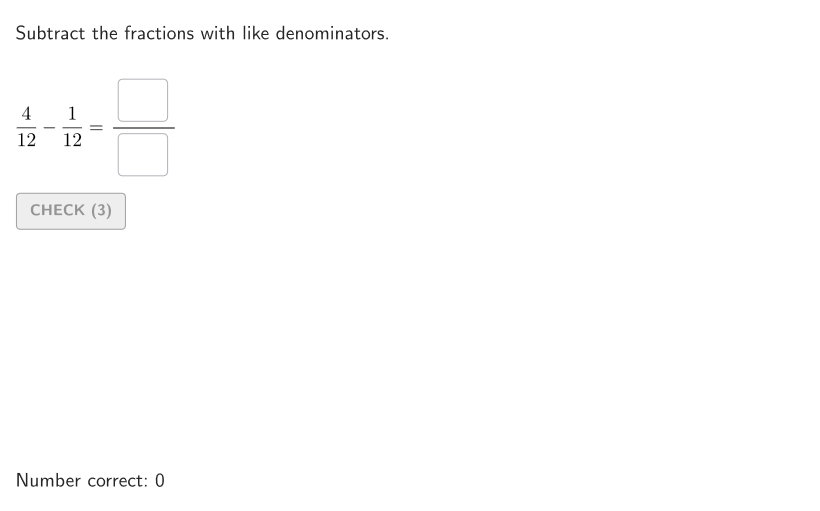
This example demonstrates how to visually understand subtracting fractions with like denominators. The key mathematical concepts involve fraction addition and subtraction while maintaining the same denominator. Construction involves using GeoGebra commands like Shuffle, Element, Sequence, and PointToPixels to create fraction graphics. It is suitable for students in grades 4-5 for classroom practice or online learning platforms.
GeoGebra Commands & Parameters
Shuffle(Sequence[t, t, 5, 12]) → allDen, {12, 10, 6, 7, 11, 8, 5, 9}Element(allDen, Mod[countQuestion, Length[allDen]] + 1) → denShuffle(Sequence[t, t, 2, den, 1]) → allNum1, {4, 5, 12, 8, 10, 9, 11, 2, 3, 7, 6}Element(allNum1, Mod[countQuestion, Length[allNum1]] + 1) → num1Shuffle(Sequence[t, t, 1, num1 - 1, 1]) → allNum2, {1, 2, 3}Element(allNum2, Mod[countQuestion, Length[allNum2]] + 1) → num2Sequence(Random[0, 99] / 100, A, 1, 200) → allRandomSeeds, {0.64, 0.83, 0.99, 0.95, 0.94, 0.27, 0.72, 0.7, 0.63, 0.65, 0.24, 0.67, 0.51, 0.47, 0.87, 0.09, 0.23, 0.04, 0.73, 0.32, 0.31, 0.3, 0.96, 0.05, 0.78, 0.75, 0.85, 0.35, 0.43, 0.29, 0.64, 0.29, 0.78, 0.76, 0.25, 0.1, 0.24, 0.86, 0.27, 0.31, 0.45, 0.65, 0.2, 0.19, 0.14, 0.61, 0.92, 0.2, 0.42, 0, 0.15, 0.9, 0.5, 0.8, 0.18, 0.66, 0.34, 0.37, 0.5, 0.45, 0.12, 0.69, 0.43, 0.59, 0.16, 0.32, 0.52, 0.91, 0.01, 0.32, 0.69, 0.17, 0.18, 0.02, 0.75, 0.51, 0.37, 0.75, 0.31, 0.69, 0.02, 0.78, 0.69, 0.55, 0.06, 0.83, 0.84, 0.22, 0.83, 0.65, 0.75, 0.16, 0.15, 0.29, 0.16, 0.24, 0.67, 0.81, 0.33, 0.1, 0.65, 0.24, 0.44, 0.23, 0.83, 0.67, 0.6, 0.7, 0.77, 0.2, 0.66, 0.83, 0.27, 0.82, 0.03, 0.09, 0.39, 0.62, 0.06, 0.28, 0.69, 0.57, 0.26, 0.08, 0.56, 0.32, 0.78, 0.97, 0.58, 0.97, 0.41, 0.72, 0.85, 0.07, 0.83, 0.9, 0.4, 0.49, 0.84, 0.48, 0.09, 0.56, 0.05, 0.27, 0.4, 0.08, 0.96, 0.35, 0.58, 0.45, 0.57, 0.24, 0.25, 0.27, 0.33, 0.29, 0.99, 0.87, 0.82, 0.57, 0.79, 0.81, 0.21, 0.71, 0.39, 0.28, 0.03, 0.61, 0.84, 0.97, 0.75, 0.05, 0.2, 0.6, 0.94, 0.09, 0.38, 0.59, 0.53, 0.66, 0.89, 0.53, 0.36, 0.6, 0.1, 0.44, 0.81, 0.63, 0.72, 0.84, 0.27, 0.5, 0.02, 0.81, 0.36, 0.89, 0, 0.71, 0.22, 0.1}Take(allRandomSeeds, randIndex, randIndex + numRandoms - 1) → currentRandomSeedsTextfield(input1) → InputBox1Textfield(input2) → InputBox2Corner(5) → layoutAppSizePointToPixels(Corner[onboardingDisplayText, 2], Corner[1], Corner[3], Corner[5]) → layoutOnboardingonboardingTextOffset(Corner[onboardingText, 1], Corner[onboardingText, 3], onboardingCase, Corner[1], Corner[3], Corner[5]) → OnboardingTextOffsetPolygon({F1, F1 + (((num1 * horSide)) / den, 0), F1 + (((num1 * horSide)) / den, vertSide), F1 + (0, vertSide)}) → frac1Sequence(Segment[F1 + ((t * horSide / den), 0), F1 + ((t * horSide / den), vertSide)], t, 1, den - 1) → vertDividers1Polygon({F1, F1 + (horSide, 0), F1 + (horSide, vertSide), F1 + (0, vertSide)}) → frameSegment(TL1, TL2) → topLineMirror(F1 + (((num1 * horSide) + (num2 * horSide)) / den, -1), x = x(F1) + ((num1 * horSide)) / den) → BLF3Segment(BLF1, BLF2) → bottomLine1Segment(BLF2 + (0, 3), BLF3) → bottomLine2Mirror(Polygon[{F1 + (((num1 * horSide)) / den, 0), F1 + (((num1 * horSide) + (num2 * horSide)) / den, 0), F1 + (((num1 * horSide) + (num2 * horSide)) / den, vertSide), F1 + (((num1 * horSide)) / den, vertSide)}], x = x(F1) + ((num1 * horSide)) / den) → frac2Segment((x(BLF1), y(BLF3)), BLF3) → bottomLineSol
AI Drawing Prompt Reference
Draw a visual model for subtracting fractions with like denominators. Start with a large rectangle as the whole, divided horizontally into equal parts equal to the denominator. Shade the left portion of the rectangle to represent the first fraction (numerator1). Then, adjacent to the shaded part on the right, draw a smaller rectangle section to represent the second fraction (numerator2), using a different color or pattern. Below the main rectangle, draw a horizontal line and mirror the subtraction result: show the remaining shaded area after removing the second fraction from the first. The graphic should clearly illustrate that only numerators are subtracted while the denominator stays the same.
The prompt above was compiled from the original drawing commands and is for reference only.