
String Art on Equilateral Triangle & Rotational Symmetry
Loading the math board and drawing, please wait…
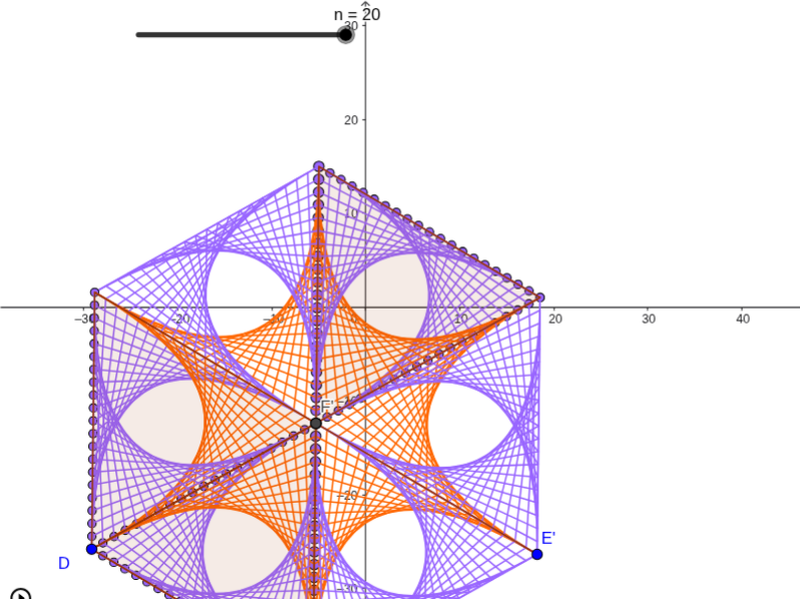
This example demonstrates string art creation on an equilateral triangle and showcases rotational symmetry. Key mathematical concepts include rotation, symmetry, and geometric construction. Using commands like Polygon, Sequence, Rotate, and Segment in GeoGebra, a series of beautiful string art patterns can be constructed. Suitable for high school mathematics education, particularly in geometry and transformation sections.
GeoGebra Commands & Parameters
Polygon(D, E, 3) → poly1, f, g, h, FSequence((i / n * D) + ((n - i) / n * E), i, 0, n) → L_2Sequence((i / n * F) + ((n - i) / n * D), i, 0, n) → L_1Sequence(Segment[Element[L_1, i], Element[L_2, i]], i, 1, n + 1) → Liste3Sequence((i / n * E) + ((n - i) / n * F), i, 0, n) → L_3Sequence(Segment[Element[L_3, i], Element[L_1, i]], i, 1, n + 1) → L_4Sequence(Segment[Element[L_3, i], Element[L_2, i]], i, 1, n + 1) → L_5Mirror(L_4, g) → L_6Mirror(L_5, g) → L_7Mirror(Liste3, g) → Liste3'Mirror(L_2, F) → L_8Mirror(L_1, F) → L_9Mirror(Liste3, F) → Liste3'_1Mirror(L_3, F) → L_{10}Mirror(L_4, F) → L_{11}Mirror(L_5, F) → L_{12}Mirror(L_6, F) → L_{13}Mirror(L_7, F) → L_{14}Mirror(Liste3', F) → Liste3''Mirror(poly1, F) → poly1'Rotate(L_6, 60°, F) → L_{15}Rotate(L_7, 60°, F) → L_{16}Rotate(Liste3', 60°, F) → Liste3''_1Rotate(E, 60°, F) → E'Rotate(F, 60°, F) → F'Segment(E', F') → g'Rotate(L_2, -60°, F) → L_{17}Rotate(Liste3, -60°, F) → Liste3'_2Rotate(L_4, -60°, F) → L_{18}Rotate(L_5, -60°, F) → L_{19}Rotate(poly1, -60°, F) → poly1'_1
AI Drawing Prompt Reference
Draw an equilateral triangle and create a series of patterns inside it by connecting the vertices and points on the sides with line segments, showcasing rotational symmetry. Start by equally spacing points along each side of the triangle and connecting them to form intricate geometric patterns. Then, reflect the pattern across the triangle's medians to create symmetry on the other side. Next, rotate the pattern by 60 degrees around each vertex and reflect it again to form a beautiful design with rotational symmetry.
The prompt above was compiled from the original drawing commands and is for reference only.