
Straight Line Mandala
Loading the math board and drawing, please wait…
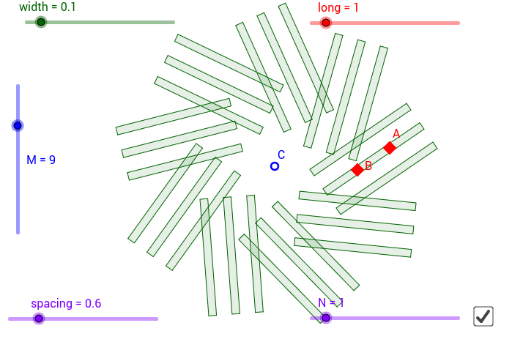
This example demonstrates how to create intricate mandala patterns using simple geometric elements. The math concepts involved include rotation, frequency distribution, rhombus, conditional probability, equilateral triangles, and arithmetic operations. It utilizes GeoGebra commands like Polygon, OrthogonalVector, and Sequence. Suitable for high school and above students interested in geometric constructions and parametric design.
GeoGebra Commands & Parameters
Polygon(((long + 1) * A) - (long * B) + (width * OrthogonalVector[Segment[A, B]]), ((long + 1) * A) - (long * B) - (width * OrthogonalVector[Segment[A, B]]), ((long + 1) * B) - (long * A) - (width * OrthogonalVector[Segment[A, B]]), ((long + 1) * B) - (long * A) + (width * OrthogonalVector[Segment[A, B]])) → poly1, f, g, h, iOrthogonalVector(Segment[A, B]) → uSequence(Translate[poly1, Vector[((i * spacing) * u)]], i, (-N), N) → list1Sequence(Rotate[list1, ((i * 360) * ° / M), C], i, 1, M) → list2
AI Drawing Prompt Reference
Create a rhombus based on two fixed points, with its shape controlled by length and width parameters, offset perpendicular to the line connecting the points. Translate this rhombus repeatedly along the perpendicular direction at equal intervals to form a row, then rotate the entire row around a central point in multiple copies evenly spaced over 360 degrees, producing a mandala-like radial symmetric pattern composed of rhombus units. The result is a geometric, radially symmetric design suitable for exploring rotation and parametric variation.
The prompt above was compiled from the original drawing commands and is for reference only.