
Interactive “Enchanted Trapezoid”: Explore what stays constant and how area chan
Loading the math board and drawing, please wait…
In collections
Trapez - Flächeninhalt
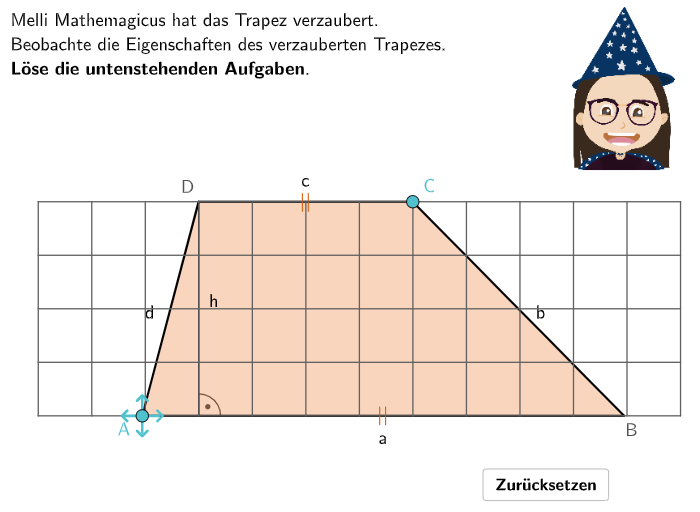
This GeoGebra lesson uses a draggable “enchanted trapezoid” to help learners observe which measurements remain unchanged when vertices move, and how the area responds. It focuses on key concepts of trapezoid properties: parallel bases (a and c), height h, and the trapezoid area formula A = (a + c)·h / 2, emphasizing reasoning from measurements to general area relationships. Construction highlights: Polygon builds the trapezoid; Point and Segment represent vertices and sides; Shuffle provides interactive repositioning; Length reads relevant side lengths and height; Text displays questions, hints, and feedback; Midpoint, Ray, and Intersect support constructing the height measure/auxiliary geometry. Angle may be used for geometric guidance/marking when needed. Designed for grades 5–6 for exploring and applying area formulas, suited to classroom inquiry and practice.
GeoGebra Commands & Parameters
Textfield(input1) → InputBox1Textfield(input2) → InputBox2Polygon(PtopLeftCornerFeedback, PtopRightCornerFeedback, PbottomRightCornerFeedback, PbottomLeftCornerFeedback) → rectangleCorrect, rectangleCorrectS3, rectangleCorrectS4, rectangleCorrectS2, rectangleCorrectS1Shuffle(Sequence[Random[0, 10], i, 1, 100]) → randomNosForX, {10, 9, 2, 6, 5, 4, 2, 10, 6, 9, 7, 1, 1, 9, 0, 9, 7, 10, 10, 7, 1, 2, 8, 3, 10, 1, 6, 2, 4, 5, 0, 1, 8, 7, 0, 9, 8, 1, 4, 9, 3, 0, 0, 9, 6, 5, 2, 2, 1, 4, 8, 0, 7, 4, 10, 10, 0, 3, 1, 5, 7, 2, 0, 0, 9, 7, 7, 1, 5, 0, 5, 4, 2, 10, 0, 5, 2, 0, 2, 4, 6, 10, 2, 8, 0, 8, 2, 7, 9, 9, 5, 7, 10, 5, 5, 2, 2, 6, 4, 6}Element(randomNosForX, Mod[questionCount, 100] + 1) → numXShuffle(Sequence[Random[0, 10], i, 1, 100]) → randomNosForY, {2, 9, 10, 4, 5, 8, 9, 8, 6, 7, 2, 0, 7, 7, 4, 6, 2, 4, 8, 8, 4, 9, 1, 2, 7, 3, 5, 4, 10, 1, 2, 6, 9, 3, 7, 4, 3, 2, 3, 6, 5, 8, 5, 3, 7, 2, 0, 4, 6, 3, 7, 1, 2, 6, 2, 2, 5, 3, 0, 6, 4, 3, 7, 8, 3, 0, 6, 3, 10, 8, 8, 2, 10, 5, 5, 6, 5, 5, 7, 7, 9, 2, 5, 6, 10, 2, 0, 0, 6, 3, 3, 7, 9, 1, 5, 5, 7, 4, 7, 4}Element(randomNosForY, Mod[questionCount, 100] + 1) → numYAppend(true, Sequence[If[randomNosForX(i) ≟ randomNosForX(i - 1), false, true], i, 2, 100]) → stayXAppend(true, Sequence[If[randomNosForY(i) ≟ randomNosForY(i - 1), false, true], i, 2, 100]) → stayYRemove(Sequence[If[stayX(i), randomNosForX(i), 0], i, 1, 100], Sequence[0, i, 1, 100]) → randomNosForXwithoutRepeatRemove(Sequence[If[stayY(i), randomNosForY(i), 0], i, 1, 100], Sequence[0, i, 1, 100]) → randomNosForYwithoutRepeatElement(randomNosForXwithoutRepeat, Mod[questionCount, Length[randomNosForXwithoutRepeat]] + 1) → numXwithoutRepeatElement(randomNosForYwithoutRepeat, Mod[questionCount, Length[randomNosForYwithoutRepeat]] + 1) → numYwithoutRepeatDefined((input1 * input2)) → fixedSegment(StreckeUnten_1, StreckeUnten_2) → iPoint(i) → ASegment(StreckeOben_1, StreckeOben_2) → hPoint(h) → CPolygon(A, B, C, D) → q1, d, c, f_1, eMidpoint(A, B) → EMidpoint(C, B) → FMidpoint(A, D) → GMidpoint(D, C) → HText("\textsf{a}", E + (0, -0.4), false, true, 0, 0) → Text1Text("\textsf{b}", F + (0.4, 0), false, true, 0, 0) → Text2Text("\textsf{c}", H + (0, 0.4), false, true, 0, 0) → Text3Text("\textsf{d}", G + (-0.4, 0), false, true, 0, 0) → Text4Text("\textsf{||}", H + (0, 0.05), false, true, 0, 0) → Text5Text("\textsf{||}", E + (0, 0.05), false, true, 0, 0) → Text6Ray(D, Vector[(0, -1)]) → jRay(A, Vector[(0, 1)]) → kIntersect(j, Segment[A, B]) → HoeheP1Intersect(k, Segment[D, C]) → HoeheP2Segment(D, HoeheP1) → lSegment(A, HoeheP2) → mAngle(B, HoeheP1, D) → αAngle(B, A, HoeheP2) → βLength(Segment[A, B]) → aSequence(VR2 + (i, 0), i, 0, 12) → l2Sequence(VR2 + (0, i), i, 0, 4) → l3Sequence(Segment[l3(i), l3(i) + (12, 0)], i, 1, 5) → l4Sequence(Segment[l2(i), l2(i) + (0, 4)], i, 1, 13) → l5Sequence(Rotate[Segment[A, A + (0, laenge)], (90° * i), A], i, 0, 3) → l6
AI Drawing Prompt Reference
Draw a trapezoid with parallel top base a and bottom base c, and a height h perpendicular to both bases. Use draggable vertices to change the trapezoid's shape and observe which measurements remain constant and how the area changes. Include auxiliary lines and labels to show the height and bases, and display the area formula: (a + c) * h / 2.
The prompt above was compiled from the original drawing commands and is for reference only.