
Stereometric projection on Riemann sphere
Loading the math board and drawing, please wait…
In collections
On Sphere
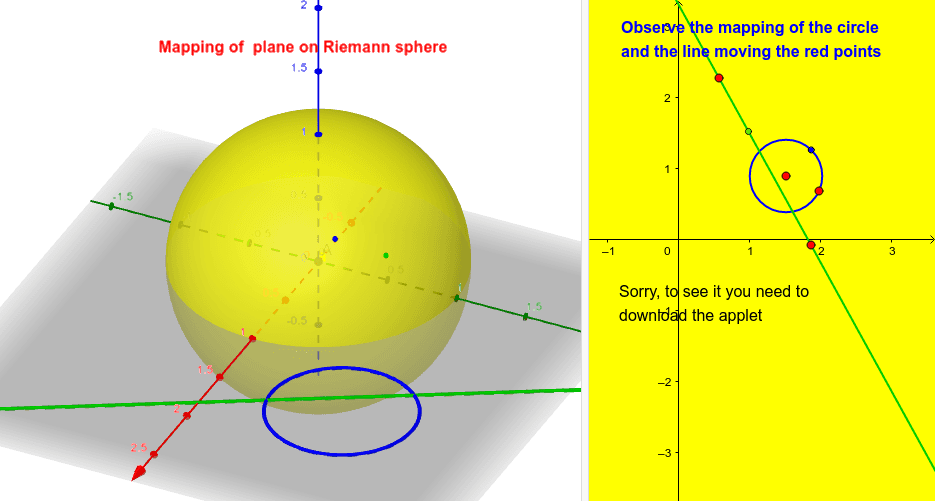
This example demonstrates stereometric projection on the Riemann sphere. It involves core mathematical concepts such as spherical geometry, projection transformations, and properties of the Riemann sphere. The construction uses GeoGebra commands and objects like Circle, Intersect, Point, Sphere, Locus, and Line. Suitable for high school and above students to understand the connection between complex numbers and geometry, as well as applications of spherical projections.
GeoGebra Commands & Parameters
Circle(U, W) → dIntersect(zAxis, xAxis) → APoint(zAxis) → BSphere(A, B) → aPoint(d) → CPoint(yAxis) → FPoint(yAxis) → OLocus(D, C) → loc1Line(R, S) → cPoint(c) → VLocus(T, V) → loc2
AI Drawing Prompt Reference
Draw a stereometric projection onto a Riemann sphere. First, draw a circle d. Then, find the intersection point A of the z-axis and x-axis. Take a point B on the z-axis, and draw a sphere a with A and B as its diameter. Next, take a point C on circle d, and points F and O on the y-axis. Draw an arc trajectory loc1 starting from C. Then, draw a line c, and an arc trajectory loc2 starting from a point V on the y-axis. Finally, take a point V on line c.
The prompt above was compiled from the original drawing commands and is for reference only.