
Stem and Leaf Plot Quick Illustrator
Loading the math board and drawing, please wait…
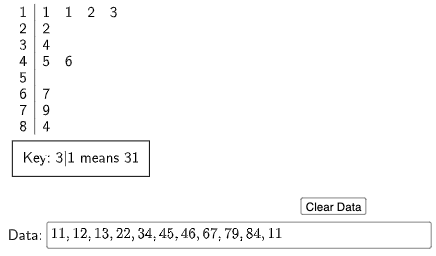
This example demonstrates how to quickly create a stem and leaf plot using GeoGebra, providing an intuitive visualization of data distribution. Core math concepts include data organization, statistical charts, and numerical distribution. Key construction elements involve the StemPlot command for generating the plot, along with Textfield, InputBox1, and button1 for user input and dynamic display. Suitable for middle school students and above, as well as teachers for introductory statistics lessons.
GeoGebra Commands & Parameters
StemPlot(l1) → text1Textfield(l1) → InputBox1
AI Drawing Prompt Reference
Create a stem and leaf plot by entering a set of data, such as 12, 23, 24, 35, 36, 47, 48, then use the StemPlot command to generate the plot and display the entered data in a text field.
The prompt above was compiled from the original drawing commands and is for reference only.