
Star Fractal Construction
Loading the math board and drawing, please wait…
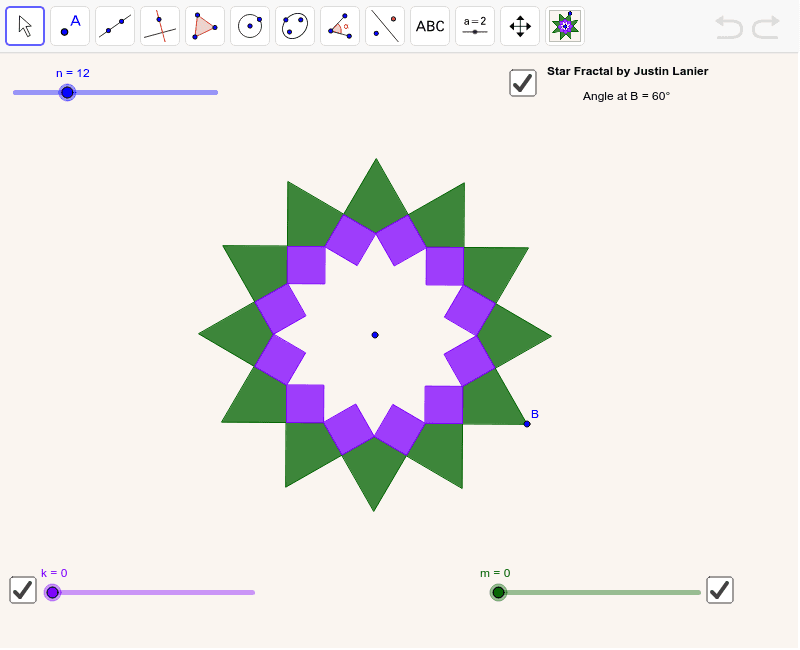
This example demonstrates how to construct a star fractal pattern using rotation and reflection operations. Key math concepts include angles, dilation, rotation, reflection, and geometric construction. The construction utilizes GeoGebra commands such as Segment, Rotate, Mirror, Intersect, Polygon, Sequence, and Angle. Suitable for high school and above students to explore the properties of fractal geometry.
GeoGebra Commands & Parameters
Segment(A, B) → aRotate(B, -90*°, (Rotate[B, (360 * ° / n), A] + B) / 2) → B'Mirror(B', Line[A, B]) → B''Intersect(Rotate[Line[B, B'], 90*°, B'], Rotate[Line[B, B''], 90*°, B'']) → CPolygon(B, B', C, B'') → poly1, b, b', c, b''Polygon(C, B', 4) → poly2, d, e, f, g, D, ESequence(Polygon[Rotate[B, ((i * 360) * ° / n), A], Rotate[B', ((i * 360) * ° / n), A], Rotate[C, ((i * 360) * ° / n), A], Rotate[B'', ((i * 360) * ° / n), A]], i, 0, n - 1) → list1Sequence(Rotate[poly2, ((i * 360) * ° / n), A], i, 0, n - 1) → list2Angle(B', B, B'') → αSequence(Dilate[list1, ratio^(i), A], i, 1, k) → list3Sequence(Dilate[list2, ratio^(i), A], i, 1, k) → list4Sequence(Dilate[list2, ratio^((-i)), A], i, 1, m) → list5Sequence(Dilate[list1, ratio^((-i)), A], i, 1, m) → list6
AI Drawing Prompt Reference
Draw a star fractal pattern by starting with a line segment, rotating and reflecting it to find three key points, and forming a quadrilateral with these points. Then, repeatedly extend the pattern by adding multiple copies of the quadrilateral around its vertices, scaling and rotating them to create a complex fractal structure.
The prompt above was compiled from the original drawing commands and is for reference only.