
SSS Similarity Exploration by G
Loading the math board and drawing, please wait…
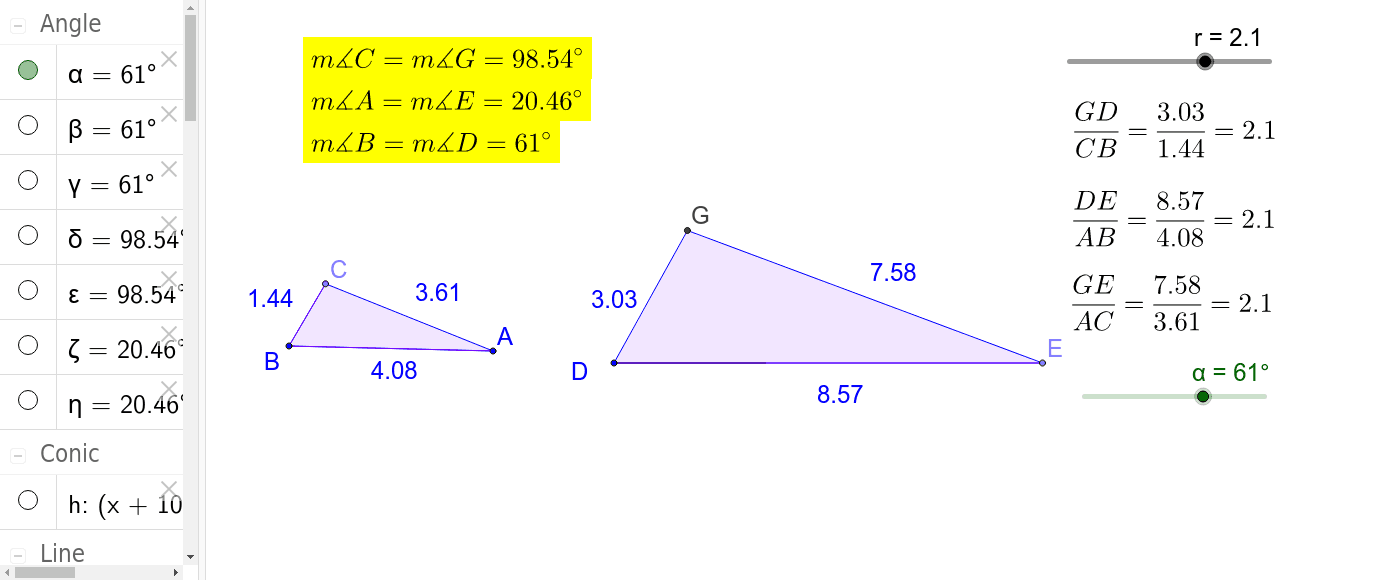
This GeoGebra applet is designed for students to explore the meaning of SSS Similarity in triangles. Key mathematical concepts include triangle similarity. Using commands like Rotate, Angle, Line, and Segment, students can dynamically observe and understand the conditions for SSS Similarity. Suitable for middle school and above students learning about similar triangles.
GeoGebra Commands & Parameters
Rotate(A, α, B) → A'Angle(A, B, A') → βLine(A', B) → aLine(B, A) → bPoint(a) → CSegment(B, C) → dSegment(B, A) → ePolygon(C, B, A) → poly1, a_1, c_1, b_1Point(Circle[D, abs(q)]) → ESegment(D, E) → cRotate(E, α, D) → E'Angle(E, D, E') → γLine(D, E') → fPoint(Circle[D, abs(p)]) → FSegment(D, F) → gCircle(D, F) → hIntersect(h, f, 2) → GPolygon(G, D, E) → poly2, e_1, g_1, d_1Angle(B, C, A) → δAngle(D, G, E) → εAngle(G, E, D) → ζAngle(C, A, B) → η
AI Drawing Prompt Reference
Draw two triangles to illustrate SSS similarity by rotating one vertex of the first triangle. Start by drawing a line from one vertex and another line from a different vertex, marking their intersection as the third vertex to form the first triangle. Rotate one vertex of the first triangle, draw new lines, and mark intersections to form the second triangle. Measure and label the corresponding angles of both triangles to show their angle relationships and verify the SSS similarity condition.
The prompt above was compiled from the original drawing commands and is for reference only.