
SSA Exploration by Azucena Overman
Loading the math board and drawing, please wait…
In collections
Triangle Congruence Exploration
Triangle Congruence
Triangle Congruence
Triangle Congruence
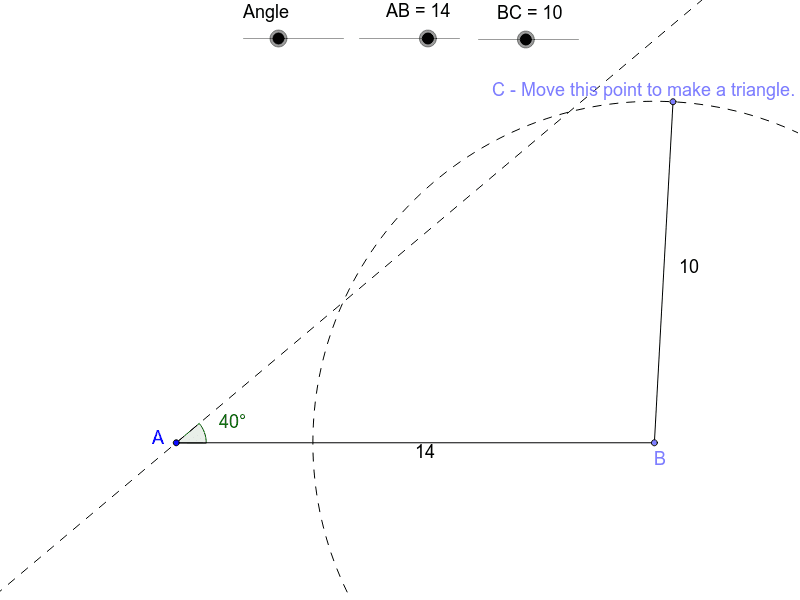
This example demonstrates the different possible triangles that can be constructed given two side lengths and an included angle, exploring the concept of SSA ambiguity in triangle construction. It involves core mathematical concepts such as triangle geometry, the SSA theorem, and geometric constructions. The construction uses commands like Point, Segment, Rotate, Angle, Line, Circle, Intersect, and Polygon. Suitable for high school mathematics education to understand and explore triangle construction under SSA conditions.
GeoGebra Commands & Parameters
Point(Circle[A, abs(AB)]) → BSegment(A, B) → dRotate(B, b, A) → B'Angle(B, A, B') → αLine(A, B') → eCircle(B, BC) → fIntersect(f, e) → C1, DSegment(D, B) → gSegment(C1, B) → hSegment(A, D) → iPoint(f) → CSegment(B, C) → jSegment(C1, C) → kSegment(D, C) → lPolygon(A, C1, B) → poly1, b_1, a_1, c1Angle(poly1) → β, γ, δPolygon(A, D, B) → poly2, b_2, a_2, d_2Angle(poly2) → ε, ζ, η
AI Drawing Prompt Reference
Draw two line segments and a point inside the angle formed by them. Rotate the point around one segment by a specified angle to get a new point, then connect the two points to form a line. Draw a circle with the new point as the center and the other segment as the radius, intersecting the line at two points. Connect each intersection point to the origin to form two triangles. Label the three angles to explore the different possible triangles under SSA conditions.
The prompt above was compiled from the original drawing commands and is for reference only.