
Squaring a Rectangle
Loading the math board and drawing, please wait…
In collections
Geometric Constructions
Geometric Constructions
Geometric Constructions-MINE
Geometric Constructions
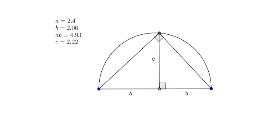
This example demonstrates how to construct a rectangle and related shapes to illustrate the concept of squaring. It involves core mathematical concepts such as polygons, inequalities, logarithmic functions, unit circle, and trigonometry. The construction uses GeoGebra commands/objects like Segment, Point, Semicircle, OrthogonalLine, Intersect, and Angle. Suitable for high school and above learners to understand the integration of geometric construction and advanced mathematical concepts.
GeoGebra Commands & Parameters
Segment(A, B) → a_1Point(a_1) → CSemicircle(A, B) → ccOrthogonalLine(C, a_1) → b_1Intersect(cc, b_1) → D,Segment(D, C) → cSegment(A, C) → aSegment(C, B) → bSegment(A, D) → dSegment(D, B) → eAngle(B, C, D) → αAngle(A, D, B) → β
AI Drawing Prompt Reference
Draw a horizontal segment as the base of a rectangle. Pick a point on this segment and construct a perpendicular line through it. Using the two endpoints of the base as diameter, draw a semicircle above. The perpendicular line intersects the semicircle at a point. Connect this intersection point to the point on the base, forming a vertical segment. Then connect the intersection point to both endpoints of the base, and also connect the base point to the endpoints, creating a rectangle with an internal triangle. Mark the angle at the base point and the angle at the intersection point to illustrate the geometric relationships in squaring a rectangle.
The prompt above was compiled from the original drawing commands and is for reference only.