
Square Rotation
Loading the math board and drawing, please wait…
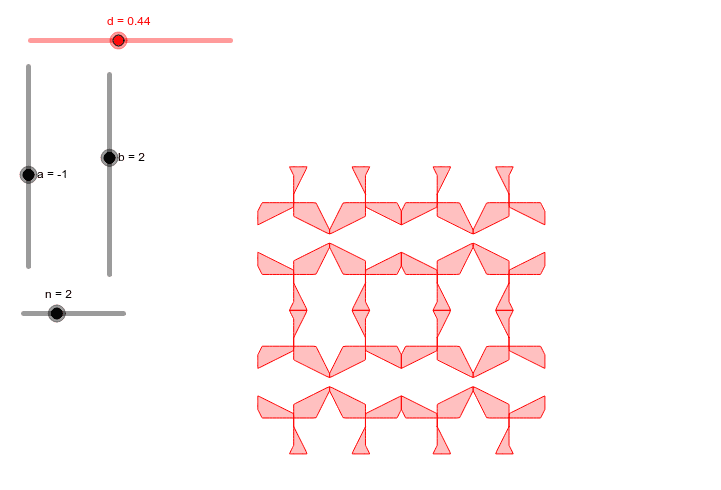
This GeoGebra example demonstrates the rotation of a square, showing the geometric phenomenon where a square rotates around a point through dynamic visualization. Core mathematical concepts involved include rotations and translations in geometric transformations, along with applications of sequences and functions such as logarithmic and tangent functions. Construction highlights: it utilizes GeoGebra commands like Function to define functions, CurveCartesian for Cartesian curves, Mirror for mirroring transformations, and Sequence to generate sequence objects; key objects include f and g as functions, cc as control curves, a, b, d as parameters, c1 to c4 as control points, n as sequence length, and liste1, liste2 as data lists. Suitable for high school or university mathematics education, particularly for teaching geometric transformations and dynamic geometry software usage.
GeoGebra Commands & Parameters
Function({0, 1, 0, 1, 1, 0, 0}) → fFunction({0, 1, 0, 0, 1, 1, 0}) → gCurveCartesian(f(t), g(t), t, 0, 4) → ccCurveCartesian((cc((a * t) - floor((a * t))) + cc((b * t) + d - floor((b * t) + d))) / 2, t, 0, 1) → c1Mirror(c1, x = 1) → c2Mirror(c1, y = 1) → c3Mirror(c1, (1, 1)) → c4Sequence(Sequence[Translate[liste1, Vector[((2 * i), (2 * j))]], i, 1, n], j, 1, n) → liste2
AI Drawing Prompt Reference
Draw a square and rotate it around a point. First, define two functions f and g, then use these functions to draw a curve cc. Next, generate four new curves c1, c2, c3, and c4 through translation and mirroring operations. Finally, use a sequence to generate a series of curves, which are translations of cc.
The prompt above was compiled from the original drawing commands and is for reference only.