
Square Roots of a Complex Number with Sliders
Loading the math board and drawing, please wait…
In collections
Roots of Complex Numbers
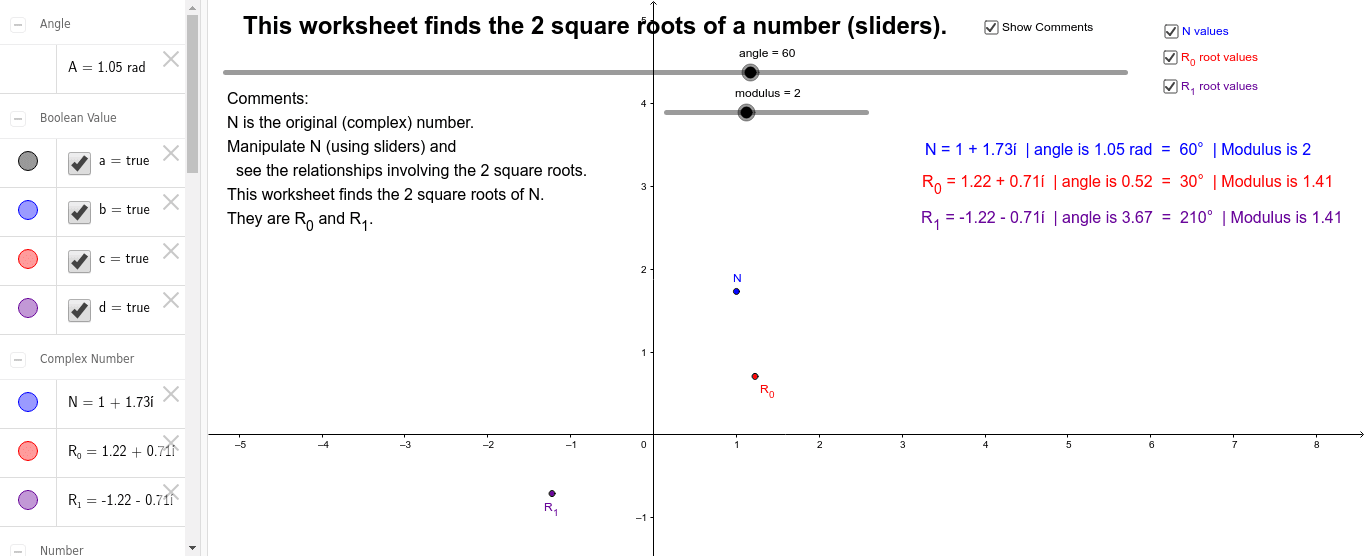
This example demonstrates graphing a complex number N and its two square roots using sliders. It involves core concepts like complex numbers, modulus, argument, and square root operations. GeoGebra commands used include modulus, R, angle, A, N, points A_0, A_1, and parameters k, b, etc., to visualize the roots geometrically. Suitable for high school mathematics education to understand complex number operations and geometric interpretations.
GeoGebra Commands & Parameters
Numeric modulus(2.0)modulusNumeric angle(60.0)angle°(R * ℯ^((ί * A)))Numeric p(2.0)(A + 0) / p(A + (2 * π)) / pabs(N)^(1 / p)(r * ℯ^((ί * A_1)))(r * ℯ^((ί * A_0)))Boolean a(true)angleBoolean b(true)A_0 / °A_1 / °Boolean c(true)Boolean d(true)
AI Drawing Prompt Reference
Draw a graph showing a complex number and its two square roots, controlled by sliders for the modulus and argument. Display the geometric meaning of complex numbers. Start by plotting the complex number, then calculate and plot its modulus and argument. Next, use the modulus and argument to draw the two square roots of the complex number. Finally, adjust parameters dynamically with sliders to observe the changes in the complex number and its square roots.
The prompt above was compiled from the original drawing commands and is for reference only.