
Square Roots and Triangular Numbers: 3D Geometric Visualization
Loading the math board and drawing, please wait…
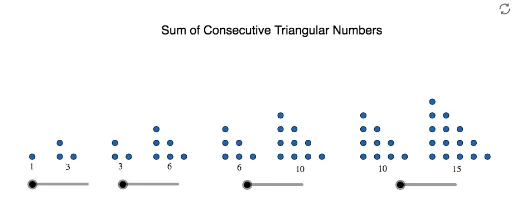
This GeoGebra example demonstrates the relationship between square roots and triangular numbers through a three-dimensional geometric construction. The core mathematical concepts include triangular numbers (integer sequence of the form n(n+1)/2), square root operations, and the interplay between polygons and solid geometry. The construction uses GeoGebra commands such as Point, Intersect, and Rotate, placing numerous labeled points (A through P_1) on or within a cylindrical surface, then rotating them to create a symmetric solid arrangement that visualizes the numerical patterns. This is suitable for high school or early college students exploring the intersection of number theory and geometry, and serves as an engaging demonstration for dynamic geometry or mathematical modeling classes.
GeoGebra Commands & Parameters
Point(xAxis) → APoint(xAxis) → BPoint(xAxis) → CPoint(xAxis) → MPoint(xAxis) → NIntersect(xAxis, yAxis) → SPoint(xAxis) → B_1Point(xAxis) → C_1Point(xAxis) → E_1Point(xAxis) → F_1Point(xAxis) → J_1Point(xAxis) → O_1Point(xAxis) → P_1Point(xAxis) → Z_1Point(xAxis) → E_2Point(xAxis) → F_2Rotate(M, ((-a) * π), Midpoint[M, G_2]) → M'Rotate(H, ((-a_1) * π), Midpoint[H, H_2]) → H'Rotate(I, ((-a_1) * π), Midpoint[H, H_2]) → I'Rotate(G, ((-a_1) * π), Midpoint[H, H_2]) → G'Rotate(N, ((-a_2) * π), Midpoint[N, I_2]) → N'Rotate(R, ((-a_2) * π), Midpoint[N, I_2]) → R'Rotate(S, ((-a_2) * π), Midpoint[N, I_2]) → S'Rotate(Q, ((-a_2) * π), Midpoint[N, I_2]) → Q'Rotate(O, ((-a_2) * π), Midpoint[N, I_2]) → O'Rotate(P, ((-a_2) * π), Midpoint[N, I_2]) → P'Rotate(F_1, ((-a_3) * π), Midpoint[F_1, J_2]) → F_{1}'Rotate(J_1, ((-a_3) * π), Midpoint[F_1, J_2]) → J_{1}'Rotate(N_1, ((-a_3) * π), Midpoint[F_1, J_2]) → N_{1}'Rotate(O_1, ((-a_3) * π), Midpoint[F_1, J_2]) → O_{1}'Rotate(G_1, ((-a_3) * π), Midpoint[F_1, J_2]) → G_{1}'Rotate(K_1, ((-a_3) * π), Midpoint[F_1, J_2]) → K_{1}'Rotate(M_1, ((-a_3) * π), Midpoint[F_1, J_2]) → M_{1}'Rotate(L_1, ((-a_3) * π), Midpoint[F_1, J_2]) → L_{1}'Rotate(H_1, ((-a_3) * π), Midpoint[F_1, J_2]) → H_{1}'Rotate(I_1, ((-a_3) * π), Midpoint[F_1, J_2]) → I_{1}'
AI Drawing Prompt Reference
The construction starts with points on the x‑axis, defines the intersection of the x‑ and y‑axes as the origin, then generates multiple point sets that are each rotated about distinct midpoints by angles proportional to π, producing a three‑dimensional symmetric arrangement on a cylinder that encodes triangular number sequences and square‑root relationships. This visual model helps students see how the numeric patterns emerge from geometric rotations and can be explored interactively.
The prompt above was compiled from the original drawing commands and is for reference only.