
Square Root Function Transformation with Sliders
Loading the math board and drawing, please wait…
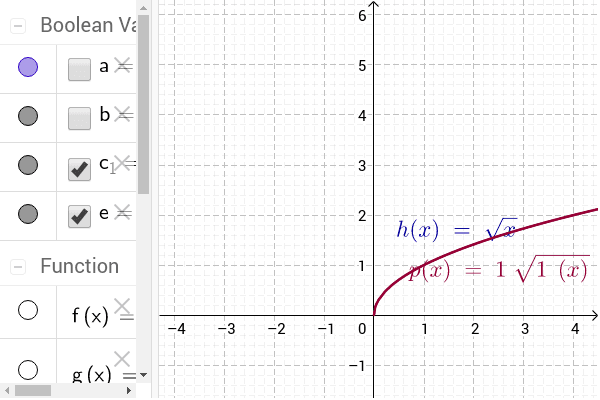
This example demonstrates the dynamic transformation of the square root function graph under translation, scaling, and reflection controlled by interactive sliders. Core mathematical concepts include elementary functions, function transformations (horizontal and vertical shifts, stretching and compressing), domain and range changes, and the characteristic shape of radical function graphs. The construction relies on GeoGebra objects d, c, k, f, v, a, h, p, c_1, g, b, e, using slider commands to adjust parameters such as a, h, and k, while the function command f plots the square root curve and associated geometric objects illustrate key points and their loci. Suitable for high school mathematics instruction, classroom demonstrations, and student-centered exploration of function behavior.
GeoGebra Commands & Parameters
Numeric d(1.0)Numeric c(1.0)Numeric k(0.0)f(x) = x^(2) + 2 x + 1Numeric v(0.0)Boolean a(false)h(x) = sqrt(x)p(x) = c h(d * (x - k)) + vBoolean c_1(true)g(x) = c f(d * (x - k)) + vBoolean b(false)Boolean e(true)
AI Drawing Prompt Reference
Draw the graph of a square root function and adjust it through sliders for translation, scaling, and reflection. Start with the basic square root function y=√x, then use sliders d, c, and k to adjust horizontal and vertical shifts, stretching, and reflection, and finally draw the adjusted function graph.
The prompt above was compiled from the original drawing commands and is for reference only.