
Square Root Function Exploration by Audrey McLaren (2)
Loading the math board and drawing, please wait…
In collections
Students' square root functions
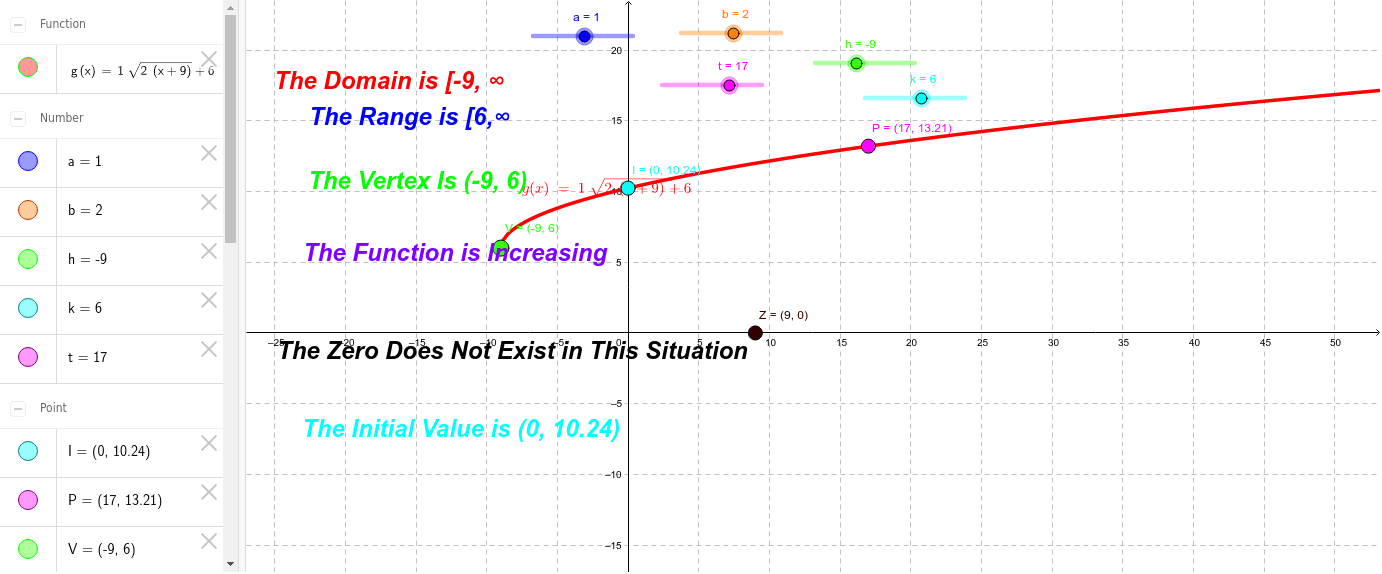
This example demonstrates a student-created exploration of the square root function using GeoGebra, focusing on graphing, properties, and coordinate geometry. Key mathematical concepts include function visualization, square root operations, and analytical geometry. The construction leverages GeoGebra commands and objects such as a, b, h, k, g, t, P, V, I, range2, range, Z, zero, initialvalue, etc. Suitable for high school mathematics education, this tool aids in understanding function behavior and graphing techniques.
GeoGebra Commands & Parameters
Numeric a(1.0)Numeric b(2.0)Numeric h(-9.0)Numeric k(6.0)g(x) = a * sqrt(b * (x - h)) + kNumeric t(17.0)(t, a * sqrt(b * (t - h)) + k)(h, k)(0, a * sqrt(b * (-h)) + k)(((-k) / a)^(2) / b + h, 0)
AI Drawing Prompt Reference
Draw the graph of a square root function with parameters a=1.0, b=2.0, h=-9.0, and k=6.0. Use these parameters to plot the function g(x) = a * sqrt(b * (x - h)) + k. Set a slider t=17.0 and mark the point (t, g(t)). Also, mark points (h, k) and (0, g(-h)) on the graph of the function, as well as the point (((-k) / a)^(2) / b + h, 0).
The prompt above was compiled from the original drawing commands and is for reference only.