
Spiral Line and Geometric Construction
Loading the math board and drawing, please wait…
In collections
geometriadinamica.es
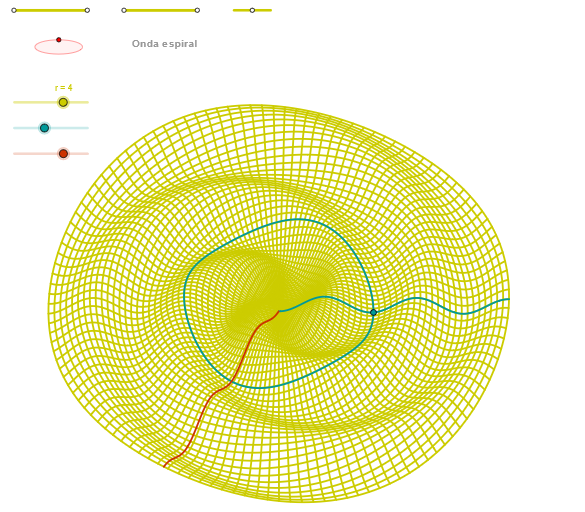
This example demonstrates the construction and application of a spiral line in geometry. The key mathematical concepts involved include vectors, area, inequalities, and geometric construction. The construction involves using GeoGebra commands such as Segment, OrthogonalLine, Circle, Intersect, Ellipse, and Angle with various objects. It is suitable for high school students or math enthusiasts learning geometric construction and graph analysis.
GeoGebra Commands & Parameters
Segment(Q5, Q6) → p5Point(p5) → P5Segment(Q3, Q4) → p2Point(p2) → P3Segment(P3, Q4) → p4Point(p4) → P4Segment(Q1, Q2) → p1Point(p1) → P1Segment(P1, Q2) → p3Point(p3) → P2OrthogonalLine(C, xAxis) → zz2Circle(C, 0.62) → zz0Intersect(zz0, zz2, 1) → ZZ4Intersect(zz0, zz2, 2) → ZZ3Ellipse(ZZ3, ZZ4, 0.65) → zElipse2Point(zElipse2) → ZIntersect(zElipse2, zz2) → ZZ7, ZZ8Angle(ZZ8, C, Z) → zAngIncOrthogonalLine(C, yAxis) → zz1Intersect(zz0, zz1, 2) → ZZ2Intersect(zz0, zz1, 1) → ZZ1Ellipse(ZZ1, ZZ2, 0.65) → zElipse1Point(zElipse1) → XYIntersect(zElipse1, zz1) → ZZ5, ZZ6Angle(ZZ6, C, XY) → zAngRotSegment(ZZ5, ZZ6) → zz4Segment(ZZ7, ZZ8) → zz3Intersect(zElipse2, zElipse1, 1) → zPunto1Intersect(zElipse2, zElipse1, 4) → zPunto2Segment(zPunto1, zPunto2) → zSeg2CurveCartesian((r / 10 * ((((5 * α / 2) * cos(u)) * sin(zAngRot)) + (((5 * α / 2) * sin(u)) * cos(zAngRot)))), (r / 10 * (((((-5 * α / 2) * cos(u)) * cos(zAngRot)) * sin(zAngInc)) + ((((5 * α / 2) * sin(u)) * sin(zAngRot)) * sin(zAngInc)) + (cos((-3 * u) + (5 * α / 2)) * cos(zAngInc)))), u, u1, u2) → curva2CurveCartesian(((r / 4 * v) * sin(zAngRot)), (r / 10 * ((((-5 * v / 2) * cos(zAngRot)) * sin(zAngInc)) + (cos((5 * v / 2)) * cos(zAngInc)))), v, v1, (2 * v2 / 5)) → curva1CurveCartesian((r / 10 * (((v * cos(β)) * sin(zAngRot)) + ((v * sin(β)) * cos(zAngRot)))), (r / 10 * (((((-v) * cos(β)) * cos(zAngRot)) * sin(zAngInc)) + (((v * sin(β)) * sin(zAngRot)) * sin(zAngInc)) + (cos((-3 * β) + v) * cos(zAngInc)))), v, v1, v2) → a1Sequence(CurveCartesian[(r / 10 * (((v * cos(u)) * sin(zAngRot)) + ((v * sin(u)) * cos(zAngRot)))), (r / 10 * (((((-v) * cos(u)) * cos(zAngRot)) * sin(zAngInc)) + (((v * sin(u)) * sin(zAngRot)) * sin(zAngInc)) + (cos((-3 * u) + v) * cos(zAngInc)))), v, v1, v2], u, u1, u2, paso / 8) → list2Sequence(CurveCartesian[(r / 10 * (((v * cos(u)) * sin(zAngRot)) + ((v * sin(u)) * cos(zAngRot)))), (r / 10 * (((((-v) * cos(u)) * cos(zAngRot)) * sin(zAngInc)) + (((v * sin(u)) * sin(zAngRot)) * sin(zAngInc)) + (cos((-3 * u) + v) * cos(zAngInc)))), u, u1, u2], v, v1, v2, paso) → list1
AI Drawing Prompt Reference
Draw a geometric construction with multiple segments and points, including two intersecting ellipses oriented horizontally and vertically around a central point. Place points on the ellipses and connect relevant points with segments. Then generate a family of spiral curves defined by parametric equations, rotating around the center to form a dynamic spiral pattern. The figure illustrates the application of spiral lines in geometry, involving vectors, area, and inequalities.
The prompt above was compiled from the original drawing commands and is for reference only.