
Sphere Volume Demonstration
Loading the math board and drawing, please wait…
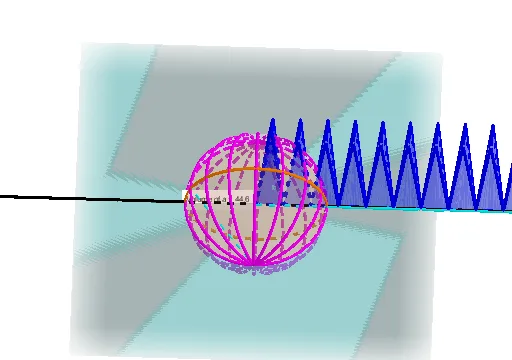
This example demonstrates the calculation of a sphere's volume. Key mathematical concepts include the volume formula for a sphere in solid geometry. Using GeoGebra commands such as Sphere, IntersectPath, Intersect, etc., the construction process of the sphere is visually illustrated. Suitable for middle school students learning solid geometry.
GeoGebra Commands & Parameters
Sphere(A, r) → aIntersectPath(b, a) → cIntersect(yAxis, c) → B, CIntersect(xAxis, c) → D, ELine(D, E) → fLine(C, B) → gRotate(c, 90°, f) → c'Intersect(c, c') → G, H, ,Sequence(Rotate[c, ((i * 360) * ° / n), g], i, 1, n) → L_1Point(L_1) → ISegment(I, G) → hSegment(I, C) → iSegment(G, C) → jOrthogonalLine(C, h, space) → kIntersect(h, k) → FSegment(C, F) → lSegment(I, E) → dxSegment(C, F) → dyCircleSector(K, A, J, xOyPlane) → dPolygon(K, A, J) → t1, j_1, k_1, a_1Pyramid(t1, L) → e, faceAKL, faceAJL, faceJKL, edgeKL, edgeAL, edgeJLSequence(CircleSector[((((2 * i) - 1) * dx / 2), dy, 0), (((i - 1) * dx), 0, 0), ((i * dx), 0, 0), xOyPlane], i, 1, (2 * n)) → L_2Sequence(Pyramid[Polygon[(((i - 1) * dx), 0, 0), ((i * dx), 0, 0), ((((2 * i) - 1) * dx / 2), dy, 0)], r], i, 1, (2 * n)) → L_3Volume(a) → volumeaPointIn(a) → Pointa
AI Drawing Prompt Reference
Draw a sphere a with radius r, then use the intersection c of the sphere and a plane to construct the cross-section of the sphere. Rotate c to get c', and find the intersection points G and H of c and c'. Then, rotate c' around c to form a series of circular sectors L_1. Select point I from L_1, and use I, G, C, and F to construct a cone e. Finally, calculate the volume of the sphere a as volumea.
The prompt above was compiled from the original drawing commands and is for reference only.