
Sphere Transformation
Loading the math board and drawing, please wait…
In collections
geometriadinamica.es
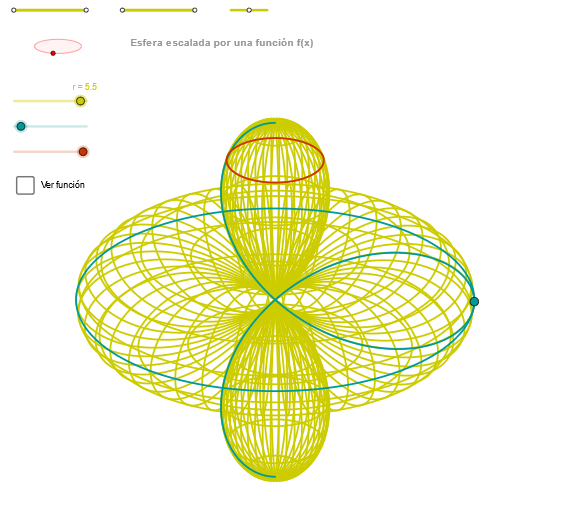
This example demonstrates the transformation of spheres. Key mathematical concepts include geometric transformations and coordinate geometry. Using GeoGebra commands such as Segment, Point, Circle, and Intersect, a series of sphere transformation graphics are constructed. Suitable for high school mathematics teaching and learning of solid geometry transformations.
GeoGebra Commands & Parameters
Segment(Q5, Q6) → p5Point(p5) → P5Segment(Q3, Q4) → p2Point(p2) → P3Segment(P3, Q4) → p4Point(p4) → P4Segment(Q1, Q2) → p1Point(p1) → P1Segment(P1, Q2) → p3Point(p3) → P2OrthogonalLine(C, yAxis) → zz1Circle(C, 0.62) → zz0Intersect(zz0, zz1, 1) → ZZ1Intersect(zz0, zz1, 2) → ZZ2Ellipse(ZZ1, ZZ2, 0.65) → zElipse1Intersect(zElipse1, zz1) → ZZ5, ZZ6Point(zElipse1) → XYAngle(ZZ6, C, XY) → zAngRotOrthogonalLine(C, xAxis) → zz2Intersect(zz0, zz2, 2) → ZZ3Intersect(zz0, zz2, 1) → ZZ4Ellipse(ZZ3, ZZ4, 0.65) → zElipse2Intersect(zElipse2, zz2) → ZZ7, ZZ8Point(zElipse2) → ZAngle(ZZ8, C, Z) → zAngIncSegment(ZZ5, ZZ6) → zz4Segment(ZZ7, ZZ8) → zz3Intersect(zElipse2, zElipse1, 1) → zPunto1Intersect(zElipse2, zElipse1, 4) → zPunto2Segment(zPunto1, zPunto2) → zSeg2CurveCartesian((r * ((((f(u) * sin(u)) * cos(α)) * sin(zAngRot)) + (((f(u) * sin(u)) * sin(α)) * cos(zAngRot)))), (r * ((((((-f(u)) * sin(u)) * cos(α)) * cos(zAngRot)) * sin(zAngInc)) + ((((f(u) * sin(u)) * sin(α)) * sin(zAngRot)) * sin(zAngInc)) + ((f(u) * cos(u)) * cos(zAngInc)))), u, u1, u2) → curva2CurveCartesian((r * (((f(3.14159 / 2) * cos(v)) * sin(zAngRot)) + ((f(3.14159 / 2) * sin(v)) * cos(zAngRot)))), (r * (((((-f(3.14159 / 2)) * cos(v)) * cos(zAngRot)) * sin(zAngInc)) + (((f(3.14159 / 2) * sin(v)) * sin(zAngRot)) * sin(zAngInc)))), v, v1, v2) → curva1CurveCartesian((r * ((((f(β) * sin(β)) * cos(v)) * sin(zAngRot)) + (((f(β) * sin(β)) * sin(v)) * cos(zAngRot)))), (r * ((((((-f(β)) * sin(β)) * cos(v)) * cos(zAngRot)) * sin(zAngInc)) + ((((f(β) * sin(β)) * sin(v)) * sin(zAngRot)) * sin(zAngInc)) + ((f(β) * cos(β)) * cos(zAngInc)))), v, v1, v2) → a1Sequence(CurveCartesian[(r * ((((f(u) * sin(u)) * cos(v)) * sin(zAngRot)) + (((f(u) * sin(u)) * sin(v)) * cos(zAngRot)))), (r * ((((((-f(u)) * sin(u)) * cos(v)) * cos(zAngRot)) * sin(zAngInc)) + ((((f(u) * sin(u)) * sin(v)) * sin(zAngRot)) * sin(zAngInc)) + ((f(u) * cos(u)) * cos(zAngInc)))), v, v1, v2], u, u1, u2, paso) → list2Sequence(CurveCartesian[(r * ((((f(u) * sin(u)) * cos(v)) * sin(zAngRot)) + (((f(u) * sin(u)) * sin(v)) * cos(zAngRot)))), (r * ((((((-f(u)) * sin(u)) * cos(v)) * cos(zAngRot)) * sin(zAngInc)) + ((((f(u) * sin(u)) * sin(v)) * sin(zAngRot)) * sin(zAngInc)) + ((f(u) * cos(u)) * cos(zAngInc)))), u, u1, u2], v, v1, v2, paso) → list1
AI Drawing Prompt Reference
Create a scene with a center point C. Draw a circle centered at C with radius 0.62. Through C, construct two perpendicular reference lines aligned with the x-axis and y-axis, and intersect them with the circle to obtain two sets of intersection points. Use these points to form two ellipses (with the ellipses determined by the corresponding intersection pairs and a fixed shape parameter of 0.65). Find the intersection points between the two ellipses at the same specified choices and connect some of them by line segments. Construct key angles using C and selected ellipse intersection points to define a rotation and an incremental direction. Finally, plot parametrized Cartesian curves that represent the transformed sphere trajectories for two parameter regions, and generate a sequence/path set by stepping through the parameters to visualize the transformation behavior.
The prompt above was compiled from the original drawing commands and is for reference only.