
Sphere & Cone Interaction Demo
Loading the math board and drawing, please wait…
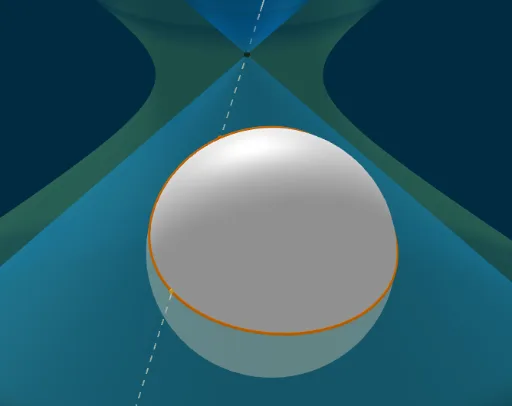
This example demonstrates the geometric shapes and trajectories formed by the interaction between a sphere and a cone. It involves core mathematical concepts such as analytical geometry, solid geometry, parametric equations, derivatives, and limits. Key GeoGebra commands and objects used in the construction include Sphere, IntersectPath, Intersect, Point, Line, Locus, Coefficients, OrthogonalPlane, and OrthogonalLine. Suitable for high school students and math enthusiasts to understand spatial geometry and advanced mathematical concepts.
GeoGebra Commands & Parameters
Sphere((K_x, 0, -3 + K_h), (K_x, 0, K_h)) → KIntersectPath(a, QuK) → dIntersect(zAxis, yAxis) → InfPoint(d) → ALine(Inf, A) → fIntersect(f, K, 2) → BLocus(B, A) → Ortslinie1Intersect(e, d) → C_x, D_xIntersect(b, d) → E_y, F_yCoefficients(d) → Koeff_dIntersect(f, K) → C, DLocus(C, A) → Ortslinie2Coefficients(QuK) → ListQuIntersectPath(e, j) → lIntersectPath(e, k) → mSphere(((-λ_M), 0, (-0.81 * λ_M)), (0, 0, 0)) → K_pOrthogonalPlane(Q_p, l) → nIntersectPath(n, QuK) → pIntersect(f, n) → HPoint(p) → P_PLine(Inf, P_P) → qIntersect(q, K_p, 2) → ILocus(I, P_P) → Ortslinie3Intersect(f, K, 1) → EIntersectPath(e, zyl) → gOrthogonalLine(KPKT, e) → sIntersect(s, zyl) → G,Intersect(g, K) → J, N, ,Intersect(s, K) → L, MOrthogonalPlane(L, s) → oIntersectPath(o, K) → rOrthogonalLine(M, s, space) → f_1OrthogonalLine(M, s, space) → g_1OrthogonalLine(M, s, space) → h_1OrthogonalLine(M, s, space) → i_1OrthogonalLine(M, s, space) → j_1OrthogonalLine(M, s, space) → k_1OrthogonalPlane(M, s) → tIntersectPath(t, zyl) → c_1
AI Drawing Prompt Reference
Draw a sphere and cone interaction demonstrating the geometric shapes and trajectories formed by their intersection. The sphere is inside the cone, and their intersection creates a curve. First, sketch the sphere and cone, then find their intersection line. Use this line to draw trajectories. Finally, construct two curves using the trajectories and intersection points, and add auxiliary lines and planes to show spatial geometry and advanced mathematical concepts.
The prompt above was compiled from the original drawing commands and is for reference only.