
Special Parallelograms Demo
Loading the math board and drawing, please wait…
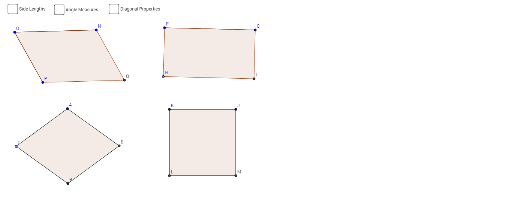
This example demonstrates the properties and criteria of special parallelograms (rectangles, rhombuses, squares). It involves core concepts like parallelograms, angle sums, diagonals, perpendicular bisectors, and similar triangles. Construction uses commands such as Segment, OrthogonalLine, Point, Line, Intersect, Polygon, Distance, Angle, LineBisector, and Circle. Suitable for high school mathematics education to visually understand geometric properties and proofs of special parallelograms.
GeoGebra Commands & Parameters
Segment(F, G) → fOrthogonalLine(F, f) → gOrthogonalLine(G, f) → hPoint(g) → HLine(H, f) → iIntersect(h, i) → IPolygon(H, I, G, F) → poly2, h_1, i_1, g_1, f_1Segment(J, K) → jPolygon(J, K, 4) → poly3, k, l, m, n, L, MSegment(N, O) → pLine(P, p) → qSegment(O, P) → rLine(N, r) → sIntersect(q, s) → QPolygon(P, Q, N, O) → poly4, p_1, q_1, n_1, oDistance(P, O) → distancePODistance(O, N) → distanceONDistance(N, Q) → distanceNQDistance(Q, P) → distanceQPDistance(F, G) → distanceFGDistance(F, H) → distanceFHDistance(H, I) → distanceHIDistance(I, G) → distanceIGDistance(K, J) → distanceKJDistance(J, M) → distanceJMDistance(M, L) → distanceMLDistance(L, K) → distanceLKAngle(poly4) → α, β, γ, δAngle(poly2) → ε, ζ, η, θAngle(poly3) → ν, ξ, ο, ρSegment(O, Q) → b_1Segment(P, N) → c_1Segment(H, G) → e_1Segment(I, F) → j_1Segment(K, M) → m_1Segment(L, J) → r_1Intersect(b_1, c_1) → RIntersect(e_1, j_1) → SIntersect(m_1, r_1) → UAngle(K, U, L) → σDistance(O, R) → distanceORDistance(R, Q) → distanceRQDistance(P, R) → distancePRDistance(R, N) → distanceRNDistance(F, S) → distanceFSDistance(S, I) → distanceSIDistance(H, S) → distanceHSDistance(S, G) → distanceSGDistance(K, U) → distanceKUDistance(U, J) → distanceUJDistance(U, M) → distanceUMDistance(U, L) → distanceULSegment(A, B) → aLineBisector(a) → bPoint(b) → CIntersect(b, a) → DCircle(D, Segment[D, C]) → cIntersect(c, b, 2) → EPolygon(C, B, E, A) → poly1, c_2, b_2, e, a_1Segment(C, E) → dSegment(B, A) → d_1Angle(C, D, B) → ιDistance(D, A) → distanceDADistance(B, D) → distanceBDDistance(D, E) → distanceDEDistance(C, D) → distanceCDAngle(poly1) → κ, λ, μ, τSegment(B, E) → k_1Segment(E, A) → l_1Segment(A, C) → s_1Segment(C, B) → t_1
AI Drawing Prompt Reference
Draw a parallelogram and label its vertices. Then, construct the diagonals and mark their intersection point. Next, draw the perpendicular bisectors of the diagonals and mark their intersections with the sides of the parallelogram. Finally, connect these intersection points to form a rectangle, rhombus, and square, labeling key angles and side lengths to demonstrate the properties of special parallelograms.
The prompt above was compiled from the original drawing commands and is for reference only.