
Sorting Three Fractions by Denominator in GeoGebra
Loading the math board and drawing, please wait…
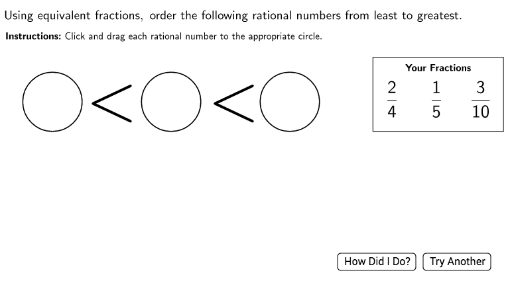
This GeoGebra example demonstrates the sorting of three fractions based on their denominators, using interactive geometric elements to visualize the comparison process. Core mathematical concepts involved include fraction ordering, least common multiple (LCM) computation, and randomization techniques. The construction utilizes commands such as Shuffle, Element, LaTeX, Circle, Polygon, If, LCM, and RandomElement, along with objects like den3, nums, and numsshuffled to generate random fractions, add check marks, and create draggable areas for an engaging sorting activity. It is suitable for upper elementary or middle school mathematics education, enhancing understanding of fractions and logical reasoning.
GeoGebra Commands & Parameters
Shuffle(nums) → numsshuffledShuffle(factors) → factorsshuffledElement(factorsshuffled, 3) → factor3LaTeX(Text["\checkmark"]) → RightCheckLaTeX(Text["×"]) → WrongCheckCircle(Circ1Point, CircRadius) → Circ1OutlineCircle(Circ2Point, Circ2Radius) → Circ2OutlineCircle(Circ3Point, Circ2Radius) → Circ3OutlineShuffle(fraclocation) → fraclocationshuffledCircle(DragPoint1, MyRadius) → Drag1AreaCircle(DragPoint2, MyRadius) → Drag2AreaCircle(DragPoint3, MyRadius) → Drag3AreaLaTeX(Text["<"]) → LT1LaTeX(Text["<"]) → LT2LaTeX(Text["\dfrac{" + num1 + "}{" + den1 + "}"]) → frac1displayLaTeX(Text["\dfrac{" + num2 + "}{" + den2 + "}"]) → frac2displayLaTeX(Text["\dfrac{" + num3 + "}{" + den3 + "}"]) → frac3displayPolygon(A, B, C, D) → poly1, a_1, b_1, c, dLaTeX(Text["\textbf{Your\ Fractions}"]) → YourFractionsLaTeX(Text["\underbrace{\hspace{10cm}}"]) → LowerLeftBraceLaTeX(Text["\overbrace{\hspace{10cm}}"]) → UpperRightBraceLaTeX(Text["\underbrace{\hspace{10cm}}"]) → LowerRightBraceLaTeX(Text["\overbrace{\hspace{10cm}}"]) → UpperLeftBraceLaTeX(Text["\overbrace{\hspace{17cm}}"]) → UpperBraceLaTeX(Text["\underbrace{\hspace{17cm}}"]) → LowerBraceIf(CircSpace1(DragPoint1), frac1display, If[CircSpace1(DragPoint2), frac2display, frac3display]) → circ1displayIf(CircSpace2(DragPoint1), frac1display, If[CircSpace2(DragPoint2), frac2display, frac3display]) → circ2displayIf(CircSpace3(DragPoint1), frac1display, If[CircSpace3(DragPoint2), frac2display, frac3display]) → circ3displayLCM(LCM[den1, den2], den3) → commondenLaTeX(Text[max]) → MaxDisplayIf(FirstAttempt, 3, Random[0, 2]) → denTypeLaTeX(Text["Using\ equivalent\ fractions,\ order\ the\ following\ rational\ numbers\ from\ least\ to\ greatest."]) → Instructions1LaTeX(Text["\textbf{Instructions\text{:}}\ Click\ and\ drag\ each\ rational\ number\ to\ the\ appropriate\ circle."]) → Instruction2RandomElement({2, 2, 2, 3, 3, 3}) → mult
AI Drawing Prompt Reference
Create an interactive math sorting activity with a large rectangular polygon in the center. Inside the rectangle, place three circular drop zones, each capable of displaying a randomly generated fraction (e.g., 1/2, 1/3, 3/4) shown in LaTeX format. Add checkmark and cross symbols near the circles for feedback. Decorate the top and bottom of the rectangle with overbrace and underbrace symbols. Include a title 'Your Fractions' and instruction text: 'Using equivalent fractions, order the following rational numbers from least to greatest.' Position three draggable fraction labels on the left side of the rectangle, each inside a small circle, so users can drag them into the correct drop zones. Use a clean geometric layout with clear text labels.
The prompt above was compiled from the original drawing commands and is for reference only.