
Solving Quadratic Equations by Completing the Square
Loading the math board and drawing, please wait…
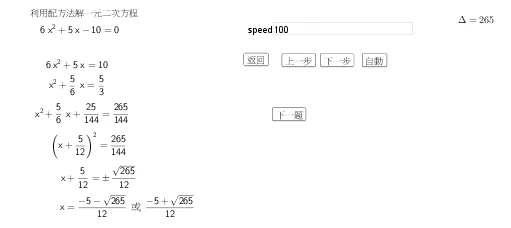
This example demonstrates solving quadratic equations using the completing the square method, showing the geometric interpretation and the process. Key math concepts include quadratic equations, completing the square, discriminant, and root distribution. GeoGebra commands like Remove, RandomElement, LaTeX, Root, SurdText, Textfield, and If are used to construct the equation, roots, text displays, and interactive buttons. Suitable for high school mathematics education to understand solution methods and parameter effects.
GeoGebra Commands & Parameters
Remove(Sequence[-15, 15], {0}) → L_1RandomElement(L_1) → pRandomElement(L_1) → qRandomElement(L_1) → rLaTeX($3) → text2LaTeX($1) → text3LaTeX($2) → text4LaTeX($4) → text5Root((a * x^(2)) + (b * x) + c) → A, BSurdText(x(A)) → text8SurdText(x(B)) → text9LaTeX($5) → text10LaTeX($6) → text11LaTeX($7) → text13SurdText(rhs) → text14Textfield(speed) → InputBox1If(g ≟ 1, 1, 0) → startIf(d ≥ 0, 7, 6) → end
AI Drawing Prompt Reference
Draw a quadratic equation graph and solve it by completing the square method, showing the distribution of roots. Randomly generate three non-zero integers p, q, and r to construct the quadratic equation px^2 + qx + r = 0. Then solve the equation to find the two roots A and B, and display their values. Also, show the discriminant and the expression of the roots.
The prompt above was compiled from the original drawing commands and is for reference only.