
Solving Equations with Model: Visual Balance and Algebraic Steps
Loading the math board and drawing, please wait…
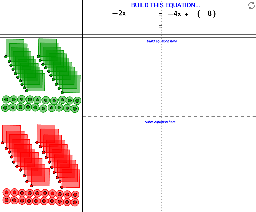
① This interactive GeoGebra example demonstrates how to build and solve a linear equation using a visual model, turning abstract algebraic operations into tangible graphical actions. ② Core mathematical concepts include equations, properties of equality, transposition and combining like terms, as well as the geometric meaning of roots (solutions); it also involves subtraction, exponential functions, and quadrilaterals as basic elements. ③ Construction highlights: using GeoGebra commands such as Point, Circle, Polygon, Ray, Intersect to create shapes, and CreatePositiveBag, CreatePositiveMarble, CreateNegativeBag, CreateNegativeMarble, CountIf, Random to simulate positive/negative 'bags' and 'marbles' with counting and random generation, thereby modeling the balance of both sides of an equation; objects include n, B series, N series, listNegBags, A, j, etc., allowing users to change quantities interactively to solve. ④ Suitable for middle and high school students learning algebra equations, and for teachers demonstrating in class, helping students understand each step of solving equations and transition from concrete models to abstract symbols.
GeoGebra Commands & Parameters
Point(n) → BPoint(j) → ACircle(M_6, a) → cCircle(A_6, b) → dPoint(d) → C_1Polygon(A_6, C_1, 4) → poly1, e, f, g, h, D_1, E_1CreatePositiveBag(b, A_1) → poly2CreatePositiveBag(b, A_5) → poly3CreatePositiveBag(b, A_3) → poly4CreatePositiveBag(b, A_4) → poly5CreatePositiveBag(b, A_2) → poly6CreatePositiveBag(b, A_7) → poly7CreatePositiveBag(b, A_8) → poly8CreatePositiveBag(b, A_9) → poly9CreatePositiveBag(b, A_10) → poly10CreatePositiveMarble(a, M_1) → kCreatePositiveMarble(a, M_4) → pCreatePositiveMarble(a, M_5) → qCreatePositiveMarble(a, M_10) → rCreatePositiveMarble(a, M_9) → sCreatePositiveMarble(a, M_3) → tCreatePositiveMarble(a, M_2) → c_1CreatePositiveMarble(a, M_8) → d_1CreatePositiveMarble(a, M_7) → e_1CountIf((x > x(A)) ∧ (x < x(B)), listPosBags) → PositiveBagsCountIf((x > x(A)) ∧ (x < x(B)), listPosMarbles) → PositiveMarblesCircle(N_4, a) → f_1CreateNegativeMarble(a, N_1) → g_1CreateNegativeMarble(a, N_2) → h_1CreateNegativeMarble(a, N_3) → k_1CreateNegativeMarble(a, N_5) → p_1CreateNegativeMarble(a, N_6) → q_1CreateNegativeMarble(a, N_7) → r_1CreateNegativeMarble(a, N_8) → s_1CreateNegativeMarble(a, N_9) → t_1CreateNegativeMarble(a, N_10) → c_2CreatePositiveBag(b, B_3) → poly11CreateNegativeBag(b, B_7) → poly12CreateNegativeBag(b, B_6) → poly13CreateNegativeBag(b, B_10) → poly14CreateNegativeBag(b, B_9) → poly15CreateNegativeBag(b, B_8) → poly16CreateNegativeBag(b, B_5) → poly17CreateNegativeBag(b, B_4) → poly18CreateNegativeBag(b, B_2) → poly19CreateNegativeBag(b, B_1) → poly20CountIf((x > x(A)) ∧ (x < x(B)), listNegMarbles) → NegativeMarblesCountIf((x > x(A)) ∧ (x < x(B)), listNegBags) → NegativeBagsCountIf(x > x(B), listNegMarbles) → NegativeMarblesRightCountIf(x > x(B), listPosBags) → PositiveBagsRightRandom(-4, 5) → ValueofXCountIf(x > x(B), listNegBags) → NegativeBagsRightCountIf(x > x(B), listPosMarbles) → PositiveMarblesRightCreatePositiveBag(b, A_11) → poly21CreatePositiveBag(b, A_18) → poly22CreatePositiveBag(b, A_12) → poly23CreatePositiveBag(b, A_17) → poly24CreatePositiveBag(b, A_15) → poly25CreatePositiveBag(b, A_20) → poly26CreatePositiveBag(b, A_16) → poly27CreatePositiveBag(b, A_14) → poly28CreatePositiveBag(b, A_13) → poly29CreatePositiveBag(b, A_19) → poly30CreatePositiveMarble(a, M_11) → d_2CreatePositiveMarble(a, M_14) → e_2CreatePositiveMarble(a, M_12) → f_2CreatePositiveMarble(a, M_15) → g_2CreatePositiveMarble(a, M_13) → h_2CreatePositiveMarble(a, M_16) → k_2CreatePositiveMarble(a, M_17) → p_2CreatePositiveMarble(a, M_18) → q_2CreatePositiveMarble(a, M_19) → r_2CreatePositiveMarble(a, M_20) → s_2CreateNegativeBag(b, B_11) → poly31CreateNegativeBag(b, B_12) → poly32CreateNegativeBag(b, B_13) → poly33CreateNegativeBag(b, B_14) → poly34CreateNegativeBag(b, B_15) → poly35CreateNegativeBag(b, B_16) → poly36CreateNegativeBag(b, B_17) → poly37CreateNegativeBag(b, B_18) → poly38CreateNegativeBag(b, B_19) → poly39CreateNegativeBag(b, B_20) → poly40CreateNegativeMarble(a, N_11) → t_2CreateNegativeMarble(a, N_12) → c_3CreateNegativeMarble(a, N_13) → d_3CreateNegativeMarble(a, N_14) → e_3CreateNegativeMarble(a, N_15) → f_3CreateNegativeMarble(a, N_16) → g_3CreateNegativeMarble(a, N_17) → h_3CreateNegativeMarble(a, N_18) → k_3CreateNegativeMarble(a, N_19) → p_3CreateNegativeMarble(a, N_20) → q_3Random(-4, 4) → SeedBagLeftRandom(-4, 4) → SeedBagRightRandom(-5, 5) → SeedMarbleLeftIntersect(j, a_1) → CIntersect(n, a_1) → DRay(C, D) → b_1
AI Drawing Prompt Reference
Draw a balance model to represent the solution of a linear equation. Start by creating two points A and n for the two sides of the equation. Then, draw two circles c and d around A and n, and create a point C on d. Next, use A and C to create a quadrilateral and add some squares and circles inside to represent positive and negative 'bags' and 'marbles'. Finally, simulate the distribution of positive and negative numbers through counting and random generation to show the solution of the equation.
The prompt above was compiled from the original drawing commands and is for reference only.