
Solving a System with Substitution 3 (Randomized Interactive Practice)
Loading the math board and drawing, please wait…
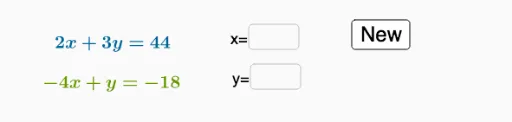
① This example demonstrates solving a system of two linear equations using the substitution method, with randomly generated coefficients and interactive answer checking. ② The core mathematical concept is the substitution method for linear systems, including algebraic simplification, variable replacement, and verifying solutions. ③ Construction highlights: from the summary, RandomElement and Random commands generate random coefficients and constants; Simplify simplifies expressions; Textfield and InputBox create input fields for user answers; button triggers validation; list1, list2 store random numbers; f and g represent the two linear equations; A, v, h likely display results or hints. ④ Suitable for middle school students (grades 7-8) learning systems of linear equations, and useful for teachers as a dynamic demonstration or for students' self-paced practice with randomized problems and immediate feedback.
GeoGebra Commands & Parameters
RandomElement(list1) → cRandomElement(list2) → dRandomElement(list2) → uRandomElement(list1) → tRandom(-3, 10) → bRandom(-3, 12) → aSimplify(f) → gSimplify(p) → qTextfield(empty1) → InputBox1Textfield(empty2) → InputBox2
AI Drawing Prompt Reference
Create an interactive practice interface for solving a system of two linear equations using substitution. Randomly generate coefficients and constants for two equations, displayed in simplified form. Include two text input fields for the user to enter the values of the two variables. Add a button that checks the answers and provides feedback. Show the randomly generated coefficient lists and possible hints to guide step-by-step substitution. Layout should be clear and suitable for middle school students.
The prompt above was compiled from the original drawing commands and is for reference only.