
Solving a Biquadratic Equation with a Parabola
Loading the math board and drawing, please wait…
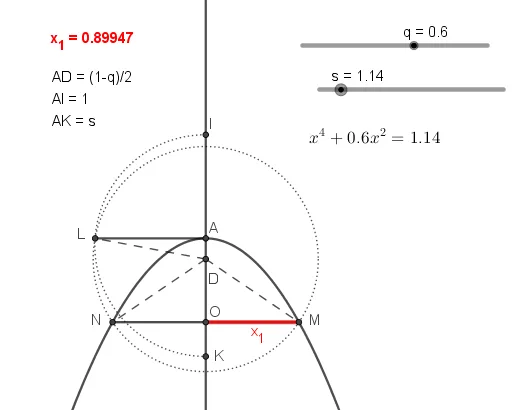
This example demonstrates how to solve a biquadratic equation using a parabola. Key mathematical concepts include parabolas, biquadratic equations, and geometric constructions. Using GeoGebra commands such as Parabola, Intersect, Segment, etc., the relationship between the equation's solutions and the geometric shapes is visually illustrated. Suitable for high school mathematics education and learning.
GeoGebra Commands & Parameters
Parabola(A_1, f) → cLine(A_1, f) → gIntersect(c, g) → B, CSegment(B, C) → lOrthogonalLine(A_1, f) → iIntersect(c, i, 1) → ACircle(A, b) → dIntersect(d, i, 1) → DCircle(A, l) → eCircle(A, k) → hIntersect(e, i, 2) → IIntersect(h, i, 1) → KSemicircle(K, I) → pLine(A, f) → jIntersect(p, j) → L,Circle(D, L) → rIntersect(r, c) → N, M, ,Segment(N, M) → mSegment(D, L) → nSegment(D, N) → tSegment(D, M) → aSegment(L, A) → f_1Intersect(i, m) → OSegment(O, M) → x_1
AI Drawing Prompt Reference
Draw a parabola, then draw a line that intersects it, find the intersection points and connect them. Next, draw a line perpendicular to the parabola, find its intersection with the parabola, use this point as the center to draw a circle, then intersect this circle with the perpendicular line to get new points, construct a semicircle, lines, and circles, and finally connect specific points to form the required geometric shape.
The prompt above was compiled from the original drawing commands and is for reference only.