
Solve a Basic Equation
Loading the math board and drawing, please wait…
In collections
EXPRESSIONS & EQUATIONS
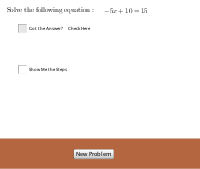
This example demonstrates solving a basic equation. Key mathematical concepts include equation solving. It uses GeoGebra commands such as RandomElement and Polygon. Suitable for middle school and above students to learn equation solving.
GeoGebra Commands & Parameters
RandomElement({-8, -7, -6, -5, -4, -3, -2, -1, 1, 2, 3, 4, 5, 6, 7, 8}) → XValueRandomElement({-5, -4, -3, -2, 2, 3, 4, 5}) → ARandomElement({-10, -9, -8, -7, -6, -5, -4, -3, -2, -1, 1, 2, 3, 4, 5, 6, 7, 8, 9, 10}) → BPolygon(D, E, F, G) → poly1, d_1, e, f, g
AI Drawing Prompt Reference
Draw a graph of a basic equation solution. First, randomly select an integer as the X value, then choose two integers as coefficients A and B. Next, draw a line based on the equation y = A*x + B. Finally, randomly select four points D, E, F, and G, and use these points to draw a quadrilateral.
The prompt above was compiled from the original drawing commands and is for reference only.