
Snub Cube
Loading the math board and drawing, please wait…
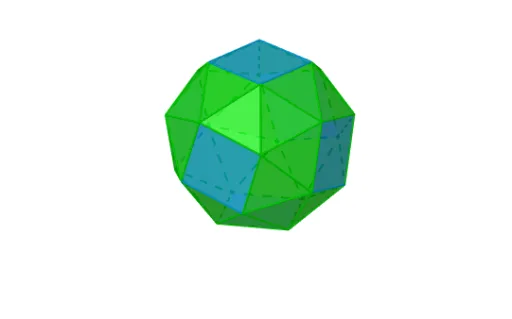
This example demonstrates the construction of a snub cube, a non-regular polyhedron with 38 faces, consisting of 32 triangles and 6 squares. The core mathematical concepts involved include polygons, angles, and solid geometry. Using commands like Polygon, Rotate, and Intersect, the various faces of the snub cube are constructed. Suitable for high school or university-level solid geometry studies.
GeoGebra Commands & Parameters
Polygon(D3, D14, D4, D13) → wielokąt1, d3, d14, d4, d13Rotate(D7, α, Line[D14, D3]) → D7'Polygon(D14, D3, D7') → wielokąt2, d7', d14_1, d3_1Rotate(D18, α, Line[D4, D14]) → D18'Polygon(D4, D14, D18') → wielokąt3, d18', d4_1, d14_2Rotate(D8, α, Line[D13, D4]) → D8'Polygon(D13, D4, D8') → wielokąt4, d8', d13_1, d4_2Rotate(D17, α, Line[D3, D13]) → D17'Polygon(D3, D13, D17') → wielokąt5, d17', d3_2, d13_2Rotate(Rotate[D21, β, Line[D17, D13]], α, Line[D3, D13]) → APolygon(D13, A, D17') → wielokąt6, d17'_1, d13_3, aRotate(Rotate[D11, β, Line[D3, D17]], α, Line[D3, D13]) → BPolygon(D3, D17', B) → wielokąt7, b, d3_3, d17'_2Rotate(Rotate[D11, β, Line[D7, D3]], α, Line[D14, D3]) → CPolygon(D7', D3, C) → wielokąt8, c, d7'_1, d3_4Rotate(Rotate[D22, β, Line[D14, D7]], α, Line[D14, D3]) → DRotate(Rotate[D22, β, Line[D18, D14]], α, Line[D4, D14]) → EPolygon(D, D14, D7') → wielokąt9, d7'_2, d, d14_3Polygon(D14, E, D18') → wielokąt10, d18'_1, d14_4, eRotate(Rotate[D12, β, Line[D4, D18]], α, Line[D4, D14]) → FRotate(Rotate[D12, β, Line[D8, D4]], α, Line[D13, D4]) → GPolygon(F, D4, D18') → wielokąt11, d18'_2, f, d4_3Polygon(D4, G, D8') → wielokąt12, d8'_1, d4_4, gRotate(Rotate[D21, β, Line[D13, D8]], α, Line[D13, D4]) → HPolygon(H, D13, D8') → wielokąt13, d8'_2, h, d13_4Rotate(Rotate[Rotate[D10, α, Line[D11, D17]], β, Line[D3, D17]], α, Line[D3, D13]) → IRotate(Rotate[Rotate[D20, α, Line[D11, D17]], β, Line[D3, D17]], α, Line[D3, D13]) → JPolygon(D17', I, J, B) → wielokąt14, d17'_3, i, j, b_1Rotate(Rotate[Rotate[D5, α, Line[D22, D7]], β, Line[D14, D7]], α, Line[D14, D3]) → KRotate(Rotate[Rotate[D24, α, Line[D22, D7]], β, Line[D14, D7]], α, Line[D14, D3]) → LPolygon(D, D7', L, K) → wielokąt15, d_1, d7'_3, l, kRotate(Rotate[Rotate[D19, α, Line[D12, D18]], β, Line[D4, D18]], α, Line[D4, D14]) → MRotate(Rotate[Rotate[D9, α, Line[D12, D18]], β, Line[D4, D18]], α, Line[D4, D14]) → NPolygon(F, D18', N, M) → wielokąt16, f_1, d18'_3, n, mRotate(Rotate[Rotate[D6, α, Line[D21, D8]], β, Line[D13, D8]], α, Line[D13, D4]) → ORotate(Rotate[Rotate[D23, α, Line[D21, D8]], β, Line[D13, D8]], α, Line[D13, D4]) → PPolygon(H, D8', P, O) → wielokąt17, h_1, d8'_3, p, oRotate(Rotate[Rotate[D23, β, Line[D8, D12]], β, Line[D8, D4]], α, Line[D13, D4]) → QPolygon(D8', G, Q) → wielokąt18, q, d8'_4, g_1Rotate(Rotate[Rotate[D10, β, Line[D17, D21]], β, Line[D17, D13]], α, Line[D3, D13]) → RPolygon(D17', R, A) → wielokąt19, a_1, d17'_4, rRotate(Rotate[Rotate[D24, β, Line[D7, D11]], β, Line[D7, D3]], α, Line[D14, D3]) → SPolygon(D7', S, C) → wielokąt20, c_1, d7'_4, s_1Rotate(Rotate[Rotate[D9, β, Line[D18, D22]], β, Line[D18, D14]], α, Line[D4, D14]) → TPolygon(D18', T, E) → wielokąt21, e_1, d18'_4, t_1Rotate(Rotate[Rotate[Rotate[D9, α, Line[D22, D5]], α, Line[D22, D7]], β, Line[D14, D7]], α, Line[D14, D3]) → UPolygon(U, K, D) → wielokąt22, d_2, u, k_1Rotate(Rotate[Rotate[Rotate[D16, α, Line[D5, D24]], α, Line[D22, D7]], β, Line[D14, D7]], α, Line[D14, D3]) → VPolygon(K, L, V) → wielokąt23, v, k_2, l_1Rotate(Rotate[Rotate[Rotate[D23, α, Line[D12, D19]], α, Line[D12, D18]], β, Line[D4, D18]], α, Line[D4, D14]) → WRotate(Rotate[Rotate[Rotate[D1, α, Line[D19, D9]], α, Line[D12, D18]], β, Line[D4, D18]], α, Line[D4, D14]) → ZPolygon(W, F, M) → wielokąt24, m_1, w, f_2Polygon(M, Z, N) → wielokąt25, n_1, m_2, z_1Rotate(Rotate[Rotate[Rotate[D10, α, Line[D21, D6]], α, Line[D21, D8]], β, Line[D13, D8]], α, Line[D13, D4]) → A_1Rotate(Rotate[Rotate[Rotate[D15, α, Line[D6, D23]], α, Line[D21, D8]], β, Line[D13, D8]], α, Line[D13, D4]) → B_1Polygon(A_1, H, O) → wielokąt26, o_1, a_2, h_2Polygon(O, B_1, P) → wielokąt27, p_1, o_2, b_2Rotate(Rotate[Rotate[Rotate[D24, α, Line[D11, D20]], α, Line[D11, D17]], β, Line[D3, D17]], α, Line[D3, D13]) → C_1Rotate(Rotate[Rotate[Rotate[D2, α, Line[D20, D10]], α, Line[D11, D17]], β, Line[D3, D17]], α, Line[D3, D13]) → D_1Polygon(C_1, B, J) → wielokąt28, j_1, c_2, b_3Polygon(J, D_1, I) → wielokąt29, i_1, j_2, d_3Rotate(Rotate[Rotate[Rotate[Rotate[D6, β, Line[D2, D10]], α, Line[D20, D10]], α, Line[D11, D17]], β, Line[D3, D17]], α, Line[D3, D13]) → E_1Polygon(I, E_1, D_1) → wielokąt30, d_4, i_2, e_2Rotate(Rotate[Rotate[Rotate[Rotate[D16, β, Line[D20, D2]], α, Line[D20, D10]], α, Line[D11, D17]], β, Line[D3, D17]], α, Line[D3, D13]) → F_1Polygon(F_1, J, D_1) → wielokąt31, d_5, f_3, j_3Rotate(Rotate[Rotate[Rotate[Rotate[D20, β, Line[D16, D24]], α, Line[D5, D24]], α, Line[D22, D7]], β, Line[D14, D7]], α, Line[D14, D3]) → G_1Rotate(Rotate[Rotate[Rotate[Rotate[D1, β, Line[D5, D16]], α, Line[D5, D24]], α, Line[D22, D7]], β, Line[D14, D7]], α, Line[D14, D3]) → H_1Polygon(L, G_1, V) → wielokąt32, v_1, l_2, g_2Intersect(l_1, l) → I_1Polygon(K, V, H_1) → wielokąt33, h_3, k_3, v_2Rotate(Rotate[Rotate[Rotate[Rotate[D15, β, Line[D19, D1]], α, Line[D19, D9]], α, Line[D12, D18]], β, Line[D4, D18]], α, Line[D4, D14]) → K_1Rotate(Rotate[Rotate[Rotate[Rotate[D5, β, Line[D1, D9]], α, Line[D19, D9]], α, Line[D12, D18]], β, Line[D4, D18]], α, Line[D4, D14]) → L_1Polygon(M, K_1, Z) → wielokąt34, z_2, m_3, k_4Polygon(Z, L_1, N) → wielokąt35, n_2, z_3, l_3Rotate(Rotate[Rotate[Rotate[Rotate[D19, β, Line[D15, D23]], α, Line[D6, D23]], α, Line[D21, D8]], β, Line[D13, D8]], α, Line[D13, D4]) → M_1Polygon(P, M_1, B_1) → wielokąt36, b_4, p_2, m_4Rotate(Rotate[Rotate[Rotate[Rotate[D2, β, Line[D6, D15]], α, Line[D6, D23]], α, Line[D21, D8]], β, Line[D13, D8]], α, Line[D13, D4]) → N_1Polygon(N_1, O, B_1) → wielokąt37, b_5, n_3, o_3Rotate(Rotate[Rotate[Rotate[Rotate[Rotate[D16, α, Line[D2, D15]], β, Line[D6, D15]], α, Line[D6, D23]], α, Line[D21, D8]], β, Line[D13, D8]], α, Line[D13, D4]) → O_1Rotate(Rotate[Rotate[Rotate[Rotate[Rotate[D1, α, Line[D2, D15]], β, Line[D6, D15]], α, Line[D6, D23]], α, Line[D21, D8]], β, Line[D13, D8]], α, Line[D13, D4]) → P_1Polygon(N_1, O_1, P_1, B_1) → wielokąt38, n_4, o_4, p_3, b_6
AI Drawing Prompt Reference
Draw a snub cube consisting of 32 triangles and 6 squares. Start by drawing a square, then rotate to generate triangles around its edges. Use rotations and intersections to build other faces, and finally connect these faces in a specific order to form the complete structure of the snub cube.
The prompt above was compiled from the original drawing commands and is for reference only.