
Small Cube and Big Cube
Loading the math board and drawing, please wait…
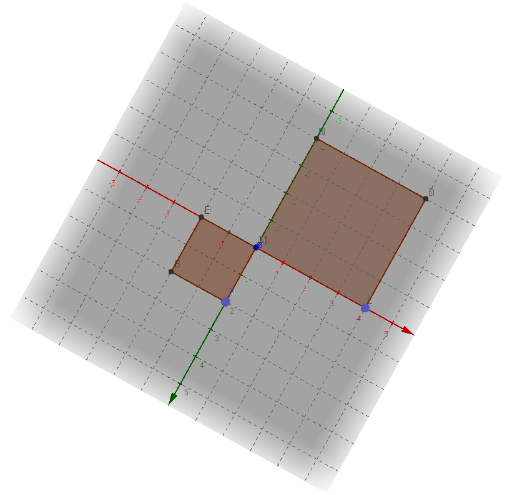
This example demonstrates the spatial relationship and geometric properties between a small cube and a large cube. Core math concepts include solid geometry, spatial symmetry, and geometric transformations. Key GeoGebra commands and objects used in construction are Intersect, Point, and Cube, as summarized. It is suitable for high school students and math enthusiasts to understand the composition and nature of three-dimensional figures, or as an aid in teaching solid geometry.
GeoGebra Commands & Parameters
Intersect(yAxis, xAxis) → APoint(yAxis) → BPoint(Circle[B, Distance[A, B], Segment[A, B]]) → CCube(A, B, C) → a, D, faceCDHG, faceEFGH, edgeAD, edgeAB, edgeBC, edgeCD, edgeAE, edgeDH, edgeEH, edgeEF, E, edgeBF, edgeFG, edgeCG, edgeGH, F, G, H, faceABCD, faceADHE, faceABFE, faceBCGFPoint(xAxis) → ICube(I, A, xOyPlane) → b, J, faceAJNM, faceJKON, faceLMNO, edgeIK, edgeAI, edgeAJ, edgeJK, edgeIL, edgeKO, edgeLO, K, edgeLM, edgeAM, edgeMN, edgeJN, edgeNO, L, M, N, O, faceAIKJ, faceIKOL, faceAILM
AI Drawing Prompt Reference
Draw a 3D coordinate system. Start at the origin, pick a point on the y-axis, then draw a circle centered at that point with radius equal to the distance to the origin, and choose a point on the circle. Use these three points to construct a small cube. Next, pick another point on the x-axis, and use it together with the origin and the horizontal plane to construct a larger cube, so that the small cube is positioned inside or adjacent to the large one, illustrating their spatial relationship and symmetry.
The prompt above was compiled from the original drawing commands and is for reference only.