
Slope-Intercept Form Interactive Exploration
Loading the math board and drawing, please wait…
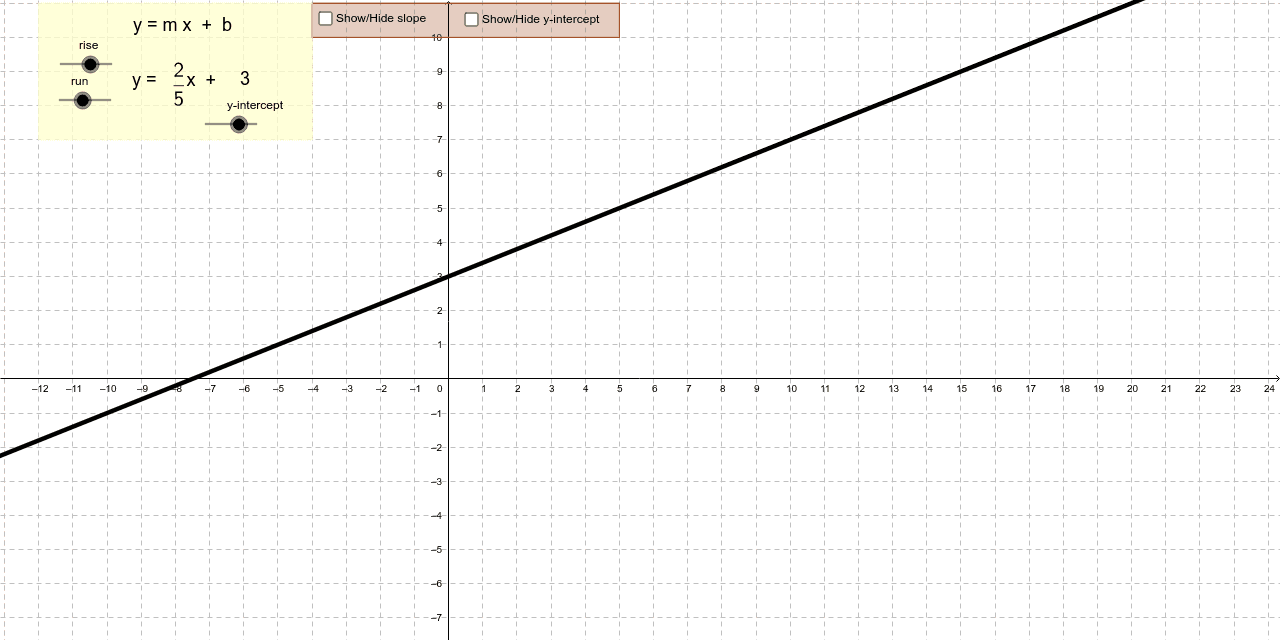
① This applet demonstrates how the slope-intercept form of a linear equation, y = mx + b, relates to its graph by allowing users to manipulate sliders and points to see real-time changes in the line's steepness and position. ② Core mathematical concepts include linear functions, slope, y-intercept, the correspondence between algebraic form and graphical representation, and the use of geometric elements like points, vectors, and midpoints in a coordinate system. ③ Construction highlights: using GeoGebra commands such as Intersect, Point, Vector, Midpoint, and Polygon, the applet builds objects like rise, run, yintercept, and a slope triangle, with sliders controlling parameters and text objects displaying numerical values dynamically. ④ Suitable for middle school to high school students learning about linear equations, and useful for teachers as an interactive demonstration tool to bridge algebraic formulas and geometric intuition.
GeoGebra Commands & Parameters
Intersect(c, yAxis) → CPoint(c) → AVector(A, SlopePoint) → uVector(SlopePoint, B) → vMidpoint(A, SlopePoint) → DMidpoint(SlopePoint, B) → EPolygon(F, G, H, I) → poly1, f, g, h, iPolygon(F, J, K, L) → poly2, f_1, j, k, l
AI Drawing Prompt Reference
Draw a coordinate plane with a straight line intersecting the y-axis at a point. Place a movable point on the line. From this point, draw a horizontal segment to a reference point on the y-axis, then a vertical segment from that reference point back to another point on the line, forming a right triangle that represents the slope. Mark the y-intercept point on the y-axis. Additionally, construct two quadrilateral regions near the line, each defined by four corner points, one adjacent to the slope triangle and the other below the line, to illustrate area relationships. Include coordinate axes, grid lines, and sliders to adjust the line's slope and intercept.
The prompt above was compiled from the original drawing commands and is for reference only.