
Slippery Surface 09
Loading the math board and drawing, please wait…
In collections
Slippery surface
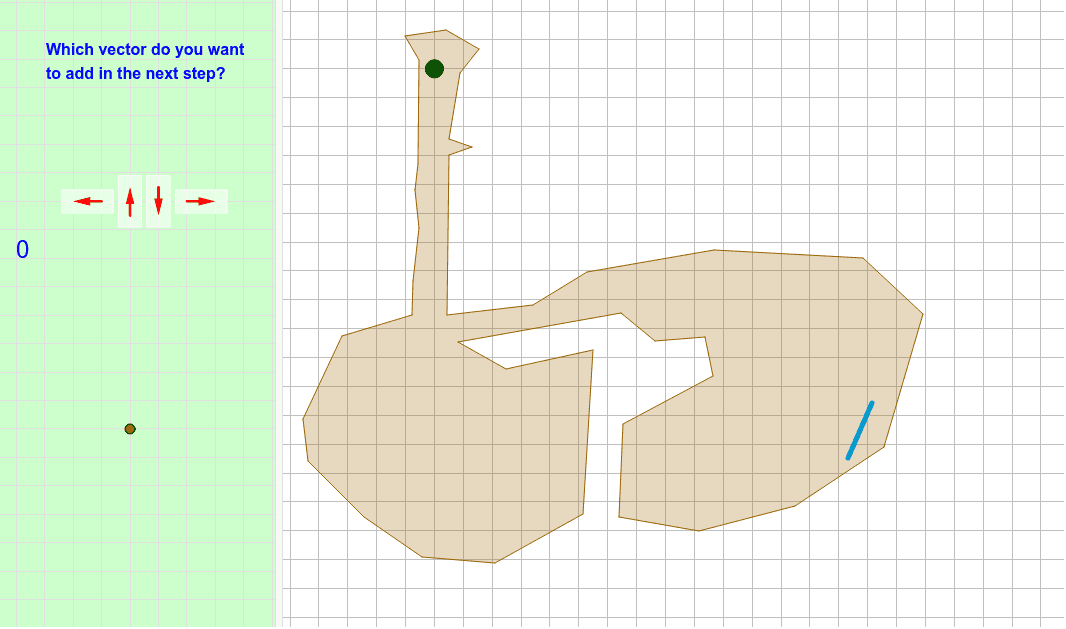
This example demonstrates dynamic geometric phenomena on an ellipse surface by applying step functions and vector transformations. Core math concepts include limits, ellipses, step functions, correlation, and cosine. Construction highlights from the summary involve commands like Polygon, Segment, Intersect, Vector, PolyLine, and Translate. Suitable for high school and above, exploring functions, geometric transformations, and calculus applications in complex graphics.
GeoGebra Commands & Parameters
Polygon(E, F, B, N, O, R, S, T, U, V, W, Z, G, A_1, B_1, C_1, D_1, E_1, F_1, G_1, H_1, I_1, J_1, H, K_1, L_1, M_1, N_1, O_1, P_1, Q_1, R_1, I, J, K, L, M, A) → camino, c, m, p, q, i_1, s_1, t_1, c_2, d_2, e_2, f_2, d, g_2, h_2, j_2, k_2, l_2, m_2, n_2, p_2, q_2, r_2, e, s_2, t_2, a_3, b_3, c_3, d_3, e_3, f_3, g_3, f, g, h, j, k, lSegment(Q, P) → segmentoIntersect(segmento, camino) → corte, corte_1, corte_2, corte_3, corte_4Segment(C, D) → llegadaIntersect(llegada, segmento) → corteganadorVector(ejemplo, ejemplopunta) → ejemplovectorPolyLine(listarastro) → rastroVector(controles + (1, 1), controles + (0, 1)) → izqVector(controles + (2, 0.5), controles + (2, 1.5)) → arrVector(controles + (3, 1.5), controles + (3, 0.5)) → abaVector(controles + (4, 1), controles + (5, 1)) → derVector(ejemplo, puntoexplicado) → vectorexplicado_1Vector(puntoexplicado, ejemplopunta) → vectorexplicado_2Vector(P, P + (i * (Q - P))) → segmentovisiblePolygon((0, 0), (0.8, 0), (0.8, 1.8), (0, 1.8)) → rectangulito, rectangulito_2, rectangulito_3, rectangulito_4, rectangulito_5Translate(Rotate[rectangulito, 90*°], controles + (5.4, 0.6)) → der_FTranslate(rectangulito, controles + (2.6, 0.1)) → aba_FTranslate(rectangulito, controles + (1.6, 0.1)) → arr_FTranslate(Rotate[rectangulito, 90*°], controles + (1.4, 0.6)) → izq_F
AI Drawing Prompt Reference
Draw a dynamic geometric phenomenon on an ellipse surface, demonstrating the application of step functions and vector transformations. Start by creating a polygonal path, then draw line segments and find their intersections with the path. Next, draw a line segment from the starting point to the endpoint and determine its intersection with the path. Use vector tools to create four directional vectors and draw a rectangle, then rotate and translate it to the four corners to form four rectangles. Finally, combine all elements to showcase dynamic geometric transformations.
The prompt above was compiled from the original drawing commands and is for reference only.