
Singapore Add/Subtract Bar 20 v1
Loading the math board and drawing, please wait…
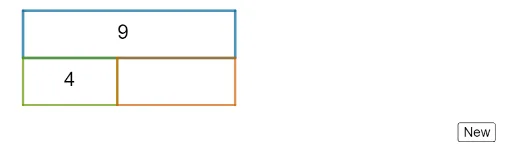
This example demonstrates the construction of a Singapore add/subtract bar. Key mathematical concepts include addition and subtraction. Using GeoGebra commands such as Random, Polygon, and Midpoint, a dynamic add/subtract bar can be created. Suitable for high-grade elementary or junior high school students to learn addition and subtraction.
GeoGebra Commands & Parameters
Random(8, 20) → aARandom(2, aA - 2) → bBPolygon(P2, P3, P4, P5) → q1, p2, p3, p4, p5Polygon(P1, P2, P8, P7) → q2, p1, f, p8, p7Polygon(P6, P7, P8, P5) → q3, p6, g, h, iMidpoint(P3, P5) → AMidpoint(P2, P7) → BMidpoint(P8, P6) → CRandom(1, 3) → qQ
AI Drawing Prompt Reference
Create an add/subtract bar diagram with two rectangles and one in the middle. First, generate two random numbers a and b, where a is between 8 and 20, and b is between 2 and a-2. Then, construct three rectangles using these numbers, with one in the middle and two on the sides. Next, find the midpoint of the middle rectangle, and generate a random number q between 1 and 3.
The prompt above was compiled from the original drawing commands and is for reference only.