
Sine Wave Pavage
Loading the math board and drawing, please wait…
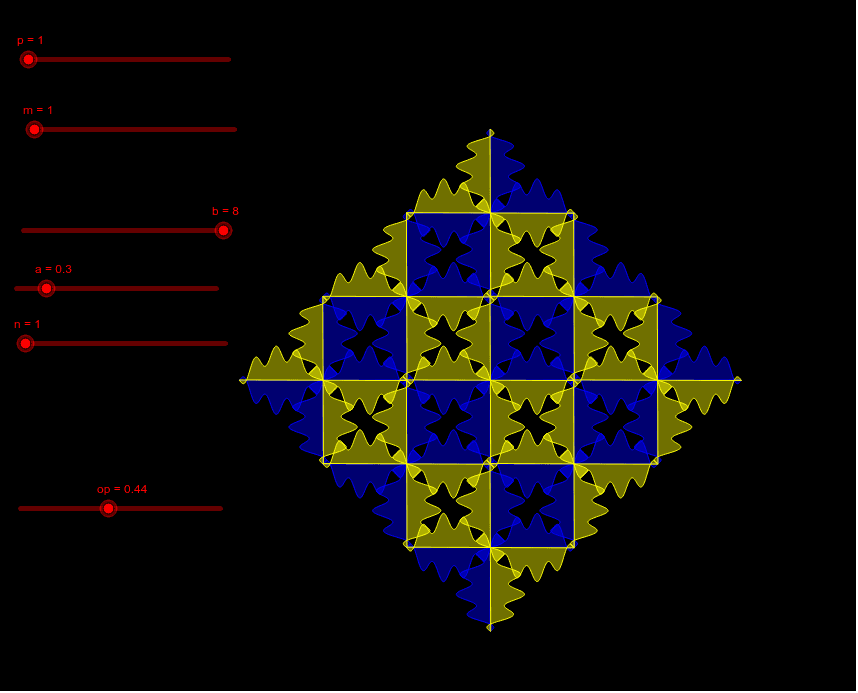
This example demonstrates how to construct a sine wave pavage through rotation and mirroring. It involves core math concepts like rotation, coordinate geometry, trigonometric functions, and vector operations. Key GeoGebra commands used include CurveCartesian, Mirror, Vector, Sequence, and Rotate. Suitable for high school students and teachers learning trigonometric functions, coordinate geometry, and transformations.
GeoGebra Commands & Parameters
CurveCartesian(t, sin(t)^(p) + (a * sin((b * t))), t, ((-n) * π), (n * π)) → coMirror(co, y = x) → co'Vector((0, ((-n) * π)), ((n * π), 0)) → uVector((0, ((-n) * π)), (((-n) * π), 0)) → vSequence(Translate[liste1, Vector[(i * u)]], i, (-m), m) → liste2Sequence(Translate[liste2, Vector[(i * v)]], i, (-m), m) → liste3Rotate(liste3, π / 2) → liste3'
AI Drawing Prompt Reference
Draw a periodic tiling pattern generated from a sine wave curve through rotation and mirroring. Start with a parametric sine wave curve whose y-coordinate is the sum of a power of sine and another sine function, with x-coordinate varying linearly with the parameter over a range from negative n pi to positive n pi. Mirror this curve across the line y equals x to obtain a second curve. Then define two direction vectors, one along the main diagonal and one along the anti-diagonal, and use these vectors as translation steps to repeatedly translate the mirrored curve across the plane, forming a grid-like arrangement of curves. Finally, rotate the entire grid by 90 degrees to obtain the final tiling pattern.
The prompt above was compiled from the original drawing commands and is for reference only.