
Sine Rule for Angle Calculation
Loading the math board and drawing, please wait…
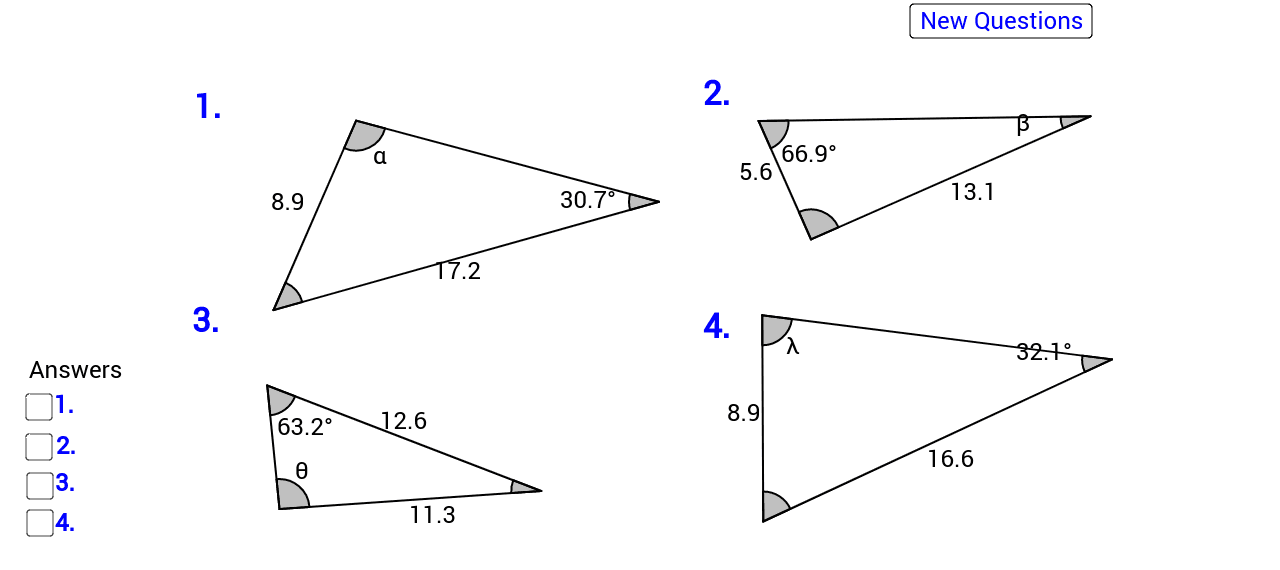
This example demonstrates how to use the sine rule to calculate angles in a triangle. It involves the core mathematical concept of the sine rule in trigonometry. Using GeoGebra commands such as Segment, Angle, Distance, etc., you can dynamically adjust the sides and angles of the triangle to observe the application of the sine rule. Suitable for high school mathematics education and learning.
GeoGebra Commands & Parameters
Segment(A_1, B_1) → a_1Segment(B_1, C_1) → b_1Segment(C_1, A_1) → aSegment(G_1, H_1) → g_1Segment(H_1, I_1) → h_1Segment(I_1, G_1) → i_1Angle(C_1, B_1, A_1) → α_1Angle(H_1, I_1, G_1) → β_1Angle(I_1, G_1, H_1) → γ_1Distance(b_1, h_1) → p_1Segment(J_1, K_1) → j_2Segment(L_1, K_1) → k_2Segment(J_1, L_1) → l_2Angle(J_1, L_1, K_1) → ε_1Distance(l_2, j_2) → m_2Segment(J_2, K_2) → j_3Segment(L_2, K_2) → k_3Segment(J_2, L_2) → l_3Angle(J_2, L_2, K_2) → ε_2Distance(l_3, j_3) → m_3Angle(B_1, A_1, C_1) → ζ_1Angle(A_1, C_1, B_1) → η_1Angle(L_2, K_2, J_2) → ξ_1Angle(K_2, J_2, L_2) → ο_1Angle(L_1, K_1, J_1) → ρ_1Angle(K_1, J_1, L_1) → σ_1Angle(G_1, H_1, I_1) → τ_1
AI Drawing Prompt Reference
Draw a triangle with labeled interior angles. From each vertex, draw perpendiculars to the opposite sides, creating four smaller triangles. Measure and label the lengths of all sides and the sides of the smaller triangles, and label the angles to demonstrate the sine rule.
The prompt above was compiled from the original drawing commands and is for reference only.