
Sine and Cosine Addition Formula Demo
Loading the math board and drawing, please wait…
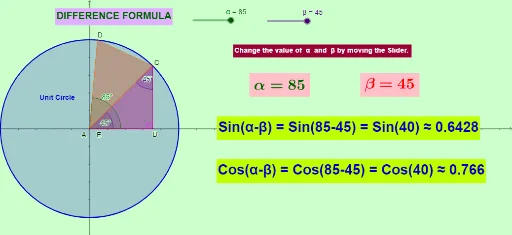
This example dynamically demonstrates the sine and cosine addition formula through geometric constructions. It involves core math concepts like trigonometric functions, vectors, and coordinate geometry. GeoGebra commands and objects such as Point, Intersect, Circle, Rotate, Line, OrthogonalLine, Polygon, Angle, Distance are used to build the geometric model. Suitable for high school and above students to understand trigonometric identities and geometric applications.
GeoGebra Commands & Parameters
Point(yAxis) → B_1Intersect(xAxis, yAxis) → ACircle(A, B_1) → cPoint(c) → C_1Rotate(C_1, β°, A) → C'_1Line(A, C'_1) → fIntersect(c, f, 2) → CLine(A, C_1) → gOrthogonalLine(C, g) → pIntersect(g, p) → BRotate(C_1, α°, A) → DPolygon(A, B, C) → poly1, q, r, sLine(A, D) → hPolygon(A, C, D) → poly2, t, a, bAngle(poly2) → γ, δ, εAngle(poly1) → ζ, η, θOrthogonalLine(D, g) → kDistance(C, D) → distanceCDAngle(B, A, D) → ιIntersect(k, q) → EDistance(A, E) → distanceAE
AI Drawing Prompt Reference
Draw a dynamic geometric construction demonstrating the sine and cosine addition formula. Start by marking the origin and point B on the x and y axes, then draw a circle centered at the origin with radius OB. Rotate point C by angles α and β to get points D and C', draw lines AC' and AC. Find the intersection point C of the circle and AC', then draw a perpendicular line to AC, meeting at point B. Finally, construct triangles ABC and ACD, labeling key angles and distances to illustrate the geometric meaning of the sine and cosine addition formula.
The prompt above was compiled from the original drawing commands and is for reference only.