
Sin, Cos (and Tan) from Triangle in Unit Circle v4
Loading the math board and drawing, please wait…
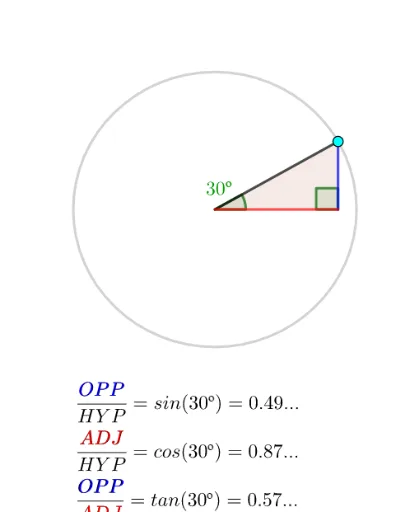
① This GeoGebra example dynamically constructs a right triangle inside the unit circle to visually demonstrate how the sine, cosine, and tangent of an angle α correspond to segment lengths on the axes. ② Core mathematical concepts include trigonometric functions, unit circle definition, right-triangle ratios, and graphing of functions. ③ Construction details: using commands such as Intersect, Circle, Point, Polygon, Angle, Segment, and If, the applet creates the unit circle c, a movable point B, triangle t1, angles α and β, and labeled segments sintick, costick, and tantick for the three functions. A slider or draggable point controls the angle, and a graph of the functions is also plotted. ④ This resource is ideal for high school trigonometry lessons, college precalculus review, and interactive exploration of the geometric meaning of sine, cosine, and tangent in relation to the unit circle.
GeoGebra Commands & Parameters
Intersect(xAxis, yAxis) → ACircle(A, 1) → cPoint(c) → BPolygon(A, B, C) → t1, c_1, a, bAngle(B, C, A) → αAngle((1, 0), A, B) → βSegment(B, (x(B) + 10, y(B))) → jSegment(C, N) → kSegment(D, (x(D) - 10, y(D))) → lIf(β ≤ π, acos(cos(β)), (2 * π) - acos(cos(β))) → angleinrad
AI Drawing Prompt Reference
Dynamically construct a right triangle inside a unit circle to show how the sine, cosine, and tangent of angle α correspond to segment lengths on the axes. One side of the triangle aligns with the x-axis, and the other with the y-axis, with the vertex on the circle. Drag the point on the circle to change the angle, and plot the corresponding function graphs.
The prompt above was compiled from the original drawing commands and is for reference only.